|
| Group |
Round |
C/R |
Comment |
Date |
Image |
| 77 |
Aug 25 |
Reply |
Thank you! I do like the rotation you introduced. In fact, I prefer it to the vertical. |
Aug 19th |
| 77 |
Aug 25 |
Comment |
I do prefer the bluish cast you gave to your image. However, I really like the bright green in the original upper right. Have you considered using a gradient to bring back color contrast?
Suggestion: Perhaps the bird's reflection could have a bit of the color and texture of the water over it--only a bit. As it is, to me, it almost looks like the bird's reflection was pasted on top of the water. A bit of waviness in that thin watery reflection might emphasize the reflection.
I do miss all the photography of these birds, which we had when we lived in South Carolina. Don't see that many big inland birds here in Portland!
Nice shot. |
Aug 12th |
| 77 |
Aug 25 |
Comment |
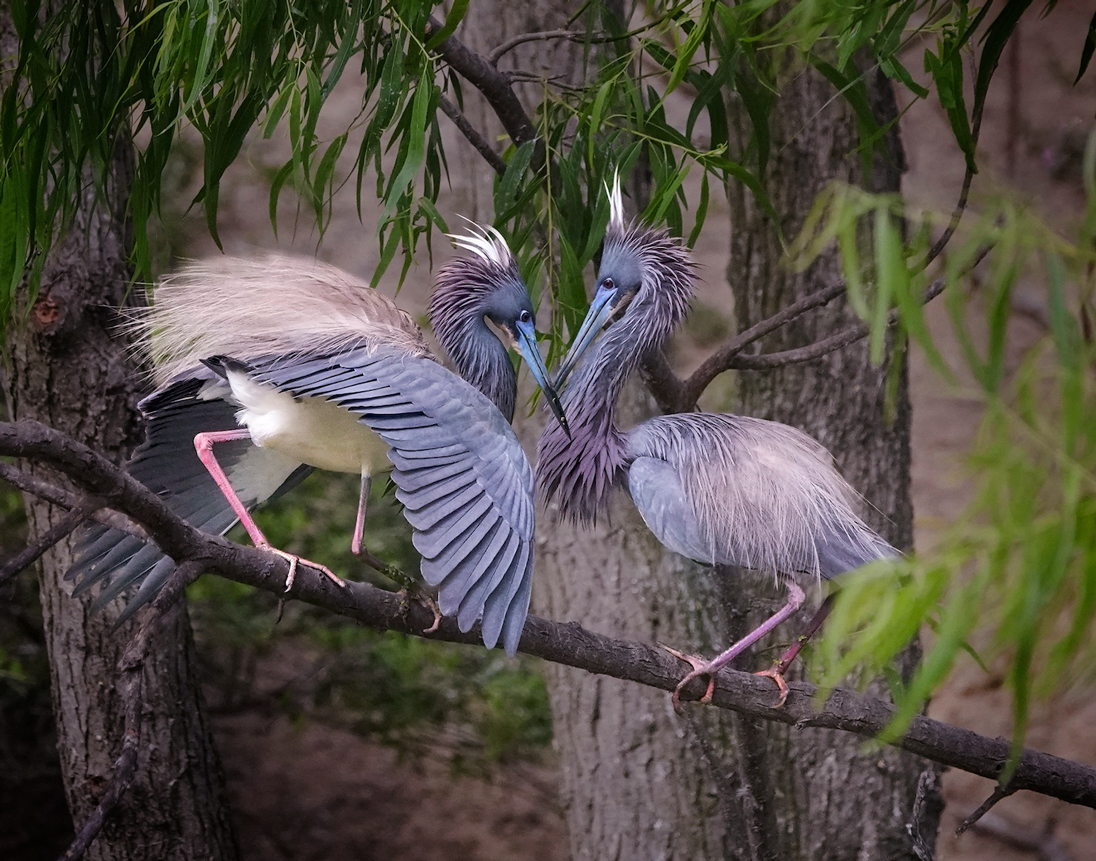
This is a lovely image. The birds are beautiful and their pose is perfect. In my opinion, this is an excellent shot.
In the final edit, I am distracted from the purity of the purpose of this pose and those beautiful birds, by all the foliage. While a nature picture should develop it in that natural setting, to me, a fine art piece should play upon the senses and focus in more on the birds, taking the eye away from the foliage, especially since the front foliage is blurrier.
I played with the image and took it into PS NIK Color Efex Pro. There I applied a graduated neutral density to each side of the image, to darken the foliage and tree trunks. Back in PS, I put a mask on the result and painted black to hide the neutral density effect over the wings of the birds, where it overlapped.
I hope you do well in competition with this image. It is a marvelous catch! |
Aug 12th |
 |
| 77 |
Aug 25 |
Comment |
Congratulations on your new family member! She is adorable. You have done a really 'cool' job of rendering her within the flowers. I appreciate that the color of the rose is close to the color in her cheeks. It seems to make her fit into that sweet flower bedding!
The second image is well done. But to me, the brightness of the yellow against the white is too distracting from the gentleness of the face. You might consider changing the background to a soft shade, rather than white.
I do love what you have done. I had a friend, Barbara Bender, who did something similar, with the baby embedded in a white rose. I always loved that effect. |
Aug 12th |
| 77 |
Aug 25 |
Comment |
Mary, I am so glad that your health is improving, even though it does take a majorly inconvenient amount of work! I hear you as you realize a lot more about adaptability. My own 4 years of recurring cancer have taught me much about that also. I've come to accept that this is just a new stage in life, and we can and do adapt, just as we did through all the other stages of life, since we want to be happy even in our new 'normal'.
Your image this month, is spectacular! It is far from an ordinary image, and deserves to be published, in my opinion. It is a testimony to your recovery process, and to your expertise as a photographer, that you can produce a beautiful image no matter where you are at, using what is around you. Prayers and blessings, and it is good to have you back! |
Aug 12th |
| 77 |
Aug 25 |
Comment |
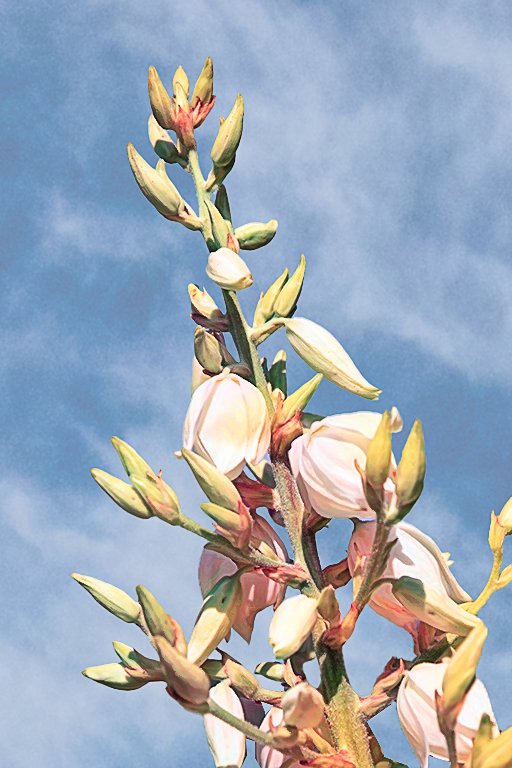
I like the way you brought out definition of this flower, by sharpening it. The colors contributed by the Watercolor Lady preset, also add to the interest, in my opinion.
The green at the bottom and the splotchy sky detracted from the image, in my opinion. I played with your original, trying to duplicate your effect. Unfortunately for my endeavors, I did not have your sky background, so I had to use my own sky.
To me, the image was sharpened to soon. Here is what I did.
I cut out the flower from the original, using the Object Selection Tool in PS along with some tidying up using the Polygonal Lasso Tool. I used Ctrl J to copy that selection to a new layer. Then I inserted a sky image beneath the isolated flower layer, along with a solid color adjustment layer beneath that. Then I applied the Watercolor Lady preset to only that flower layer.
To finish off, I sharpened, duplicating the flower layer and using Filter > Other > High Pass in Overlay mode to sharpen just the top flower layer. |
Aug 12th |
 |
| 77 |
Aug 25 |
Comment |
Carol, this is lovely. I really like the color palate you have created.
I find it amusing that three of us have chosen to submit images of weeds, in all their beauty, this month! |
Aug 11th |
6 comments - 1 reply for Group 77
|
6 comments - 1 reply Total
|

















































































































