|
| Group |
Round |
C/R |
Comment |
Date |
Image |
| 34 |
Jul 19 |
Comment |
You certainly turned that partial glass image into a work of art! I too love the colors and the geometry of this. The stroke was an important touch, in my opion. |
Jul 14th |
| 34 |
Jul 19 |
Comment |
I love this image! The cartoon effect, the colors, everything. I am especially interested in that wisp above the book and echo Jan's query! Also, I'm wondering what you used out of the second original. The book in your image looks so different than the book in the second original. I'd have liked to see more of the component images.
This was excellently done! |
Jul 14th |
| 34 |
Jul 19 |
Comment |
Your concept is very good, in my opinion.
I agree that there is too much space at the top of the image and that a panorama might work better. As to the flags, I'd just move the rightmost one down a bit, so it doesn't rise over the foot of the ghost. One could anchor them by putting just a bit of the gray ground over the bottom of the posts, leaving a semi-opaque appearance to the dirt OR put a plain, round foundation on them. |
Jul 14th |
| 34 |
Jul 19 |
Comment |
Your granddaughter is so lovely. The dark vignette is more appealing to me. However, the total image doesn't do much for me, as personally, I don't care for the head cut off effect. To me, Jan's version helps. I guess I would have used her entire picture with the flower more like a collar.
What I find so funny is that I was considering doing the same thing for this month, but couldn't make it work. One of my favorite images is from a Canadian friend. She put an image of her infant grandchild in the center of a large, beautiful white flower. The entire baby was in the image, on its back and kicking, if I remember it correctly. I wanted to use the same idea with my great grandbaby, but my images just didn't work with it! |
Jul 14th |
| 34 |
Jul 19 |
Comment |
Your creation is so aptly named Steve! I do feel sorry for her, as her head looks much to wide to me! One thing that might me interesting to try is to put the three sections of her head at different levels, so that the top of the three sections has three different levels, rather than a smooth curve. The inserted jagged breaks are well done, in my opinion. The concept is very clever, and well tells the story of the busy brain on a sleepless night! |
Jul 10th |
| 34 |
Jul 19 |
Comment |
Jan, once again you have produced an outstanding creation! I do love the multicolored birds. Also, your technique is fascinating. Thanks for the instruction. Going outside the routine, and experimenting with all that PS has to offer is something we should all be doing more of, in my opinion! It's just darn fun, in addition to being creative. |
Jul 10th |
6 comments - 0 replies for Group 34
|
| 83 |
Jul 19 |
Comment |
Jane, thank you for presenting us with such a lovely and challenging image. Obviously, it was something many of us wanted to dive into and play with. Perhaps we all would have grabbed the opportunity to be in such a lovely place early in the morning! |
Jul 25th |
| 83 |
Jul 19 |
Reply |
I like your focus through cropping. I couldn't crop in camera because of the distance required between myself and the horses. Actually, the older horse was not the mother. The mother wanted to keep her foul close, but like all children, the foul insisted on wandering off. At first the older horse sort of sneered at the foul and seemed to want it to stay away, but then it accepted the foul and the result was quite touching. |
Jul 25th |
| 83 |
Jul 19 |
Reply |
Nice, Peter!
|
Jul 25th |
| 83 |
Jul 19 |
Comment |
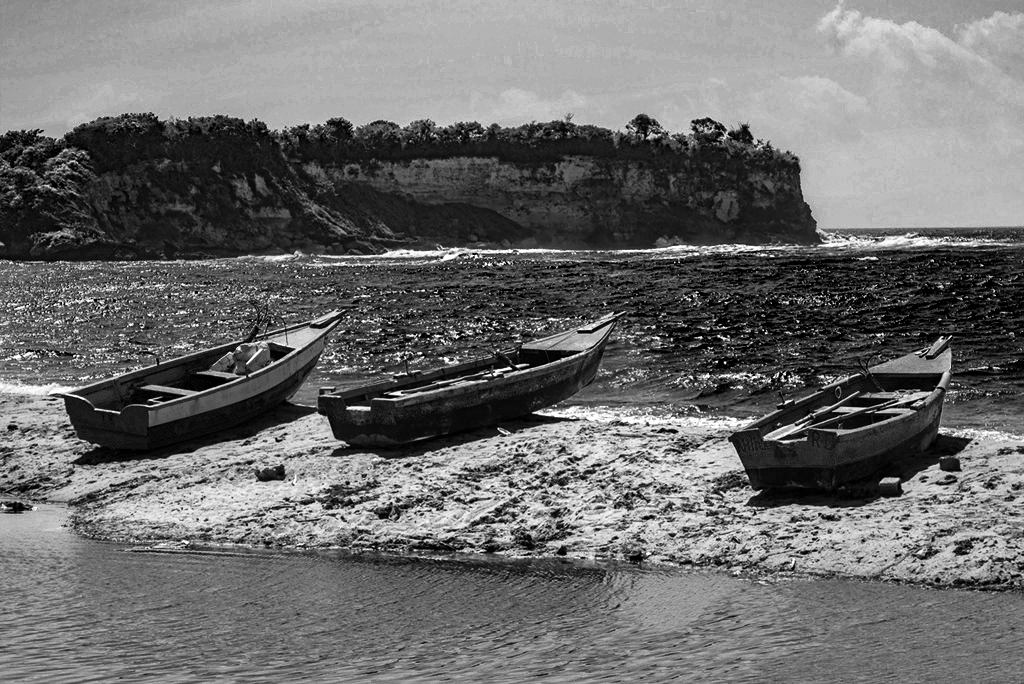
I prefer your color image, perhaps because I am in love with the sea in all its moods and colors! However, I'm not sure what editing software you use, but in PS CC, you can bring out the contrast with adjustment layers, and painting black on their masks.
To do this, I added a Brightness/Contrast adjustment layer first, with the brightness slider slightly down, and the contrast layer quite high. I painted with black over the bottoms of the two rightmost boats, so that their light/dark differences would remain unchanged. Then I added a BW adjustment layer. Red slider is slightly to the right; yellow is more to the right; green slider is way down, to bring out the green in the sea; Cyan is down but not as much; Blue is way up to bring out the blue in the river. I just played with the sliders until the various areas were separated and shown to my preference. The result was a bit dark, so I added an Exposure adjustment layer to slightly up the exposure. |
Jul 24th |
 |
| 83 |
Jul 19 |
Comment |
In my opinion, you did a good job of photographing Uncle Harry. I do appreciate the tonal values of the second development more than the first. It is softer and brings out his face and character better.
I wasn't a fan of the heavy weight of black on your first posted image, but with the second (on white), I realized that the black was not so extensive. Also , you cropped it a bit on the right, which helped. When one has black displayed against black, it might be a good idea to put a 2 pixel white stroke around the image border.
Your image is lovely in my opinion. I wish you luck on your portrait en devours. Thank you for the explanation you gave. I don't do portraiture, but would love to learn it! |
Jul 24th |
| 83 |
Jul 19 |
Comment |
A black and white image of a peacock is an interesting switch! You did a good job of accentuating the eyes, including the catch light in the real eye. The result makes for a nice pattern, as well as a good picture. |
Jul 24th |
| 83 |
Jul 19 |
Comment |
Both images are lovely. The monochrome gives a bit more of the mood of a misty morning on a lake, in my opinion. I agree with Jose that a bit more black on the ducks enhances the range of grey tones, as well as the impact of the image. However, a misty morning would tend to make the ducks lighter.
I added some graduated fog at the bottom, from NIK Color Efex Pro, and then added a mask to take some of it out. The objective was to have billowing but sporadic patches of fog and to add fog around only parts of the ducks. I used the burn tool to darken the foreground ducks and added a Brightness/Contrast adjustment layer with a black inverted mask, to paint with white and darken the middle duck even more. Finally, I cropped the sky and the left side a bit, to lessen the visual weight of the surroundings and bring the emphasis more to the ducks. |
Jul 24th |
| 83 |
Jul 19 |
Reply |
Yes, that is probably the tail. I didn't even notice that, so thanks for pointing it out. I should probably lighten that area. I didn't touch the legs in post processing, so it's probably just the angle of the shot that makes the back leg seem strange. That said, these horses all had visible things out of wack. They are not treated in any way, as the park service wants to keep them totally natural. The subsist on what grass they can find, and if they get sick and die, so be it (according to the park service). Most were very skinny and many had large fungal like spots on their bodies. I found it sad. Still, they were beautiful. |
Jul 18th |
5 comments - 3 replies for Group 83
|
11 comments - 3 replies Total
|

















































































































