Activity for User 502 - Murphy Hektner - mhektner@frontier.com

avatar
Avatar

Close this Tab when done


838 Comments / 243 Replies Posted

  = Current Round   = Previous Round
Group Round C/R Comment Date Image
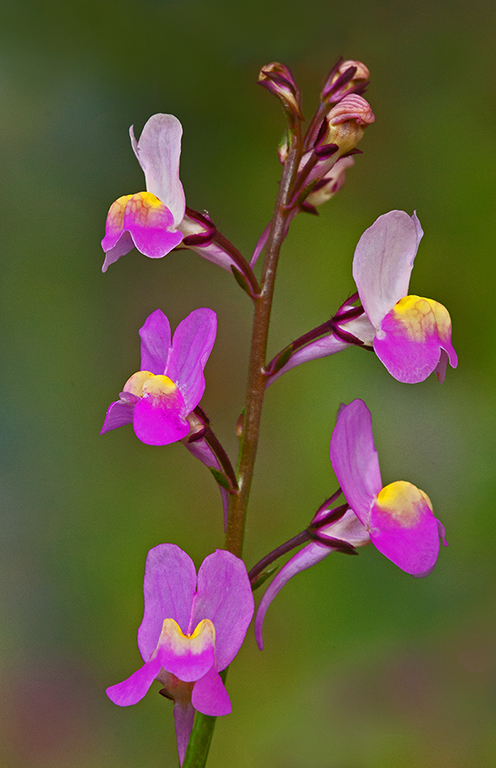
63 Jun 22 Reply Hi Priscilla: Thanks for your thoughts on my Spanish Lavender picture, they are appreciated. Jun 23rd
63 Jun 22 Comment Hi Charlie: Thanks so much for sharing your detailed process in arriving at the finished image with all of the various steps you do. I do not think really good flower photography is appreciated today like it should be, in my humble opinion there is far too much emphasis placed on wildlife action pictures. Also I do not think the "general photographer" has any idea how much work goes into an excellent picture of a flower as you present it. cheers. Jun 23rd
63 Jun 22 Comment Hi Shaji: Welcome to Close-up Group #63.

Overall you have done very well in photographing this event in nature, a good nature story showing the two Ants fighting. The soft green out of focus background supports the yellow flower very well, a nice blending of colors in nature. You have attained good sharpness through out the picture. Charlie has mentioned a couple of small items in the bottom right corner; on the left side of the frame the yellow flower stalk is very close to the left border, It would be good to leave a little more "breathing room" space from the end of the flower stalk to the edge of the picture area. Looking forward to viewing your fine work in the coming rounds.
Jun 9th
63 Jun 22 Reply Hi Charlie: Pleased you liked the Spanish Lavender.

In answer to your question what is "deadheading". Deadheading is the term used in the nursery trade and by experienced gardeners and it is the cutting off of old spent flowers from the plant. If this is not done the plant will think the growing season has ended and quit setting new flower buds. If the old spent flowers are removed the plant will continue to set new flower buds and will continue to bloom for a much longer time.
Jun 9th
63 Jun 22 Comment Hi Priscilla: Cell phones just keep improving in their ability to render a good picture, the exposure on the yellow petals is good. You have placed the 3 yellow flowers within the frame pretty well, the bottom flower is quite sharp in detail with some texture on the yellow petals. The central part of the flower to the upper left is somewhat soft. At the very top the two leaves have a slight halo around them. The addition of the white border adds to the overall scene. Jun 4th
63 Jun 22 Comment Hi Barbara: Your Pink Carnation carries a lot of impact against the black background. Really like the placement of the single carnation within the frame biased to the right, you have followed the rule of thirds well. The entire carnation flower is very sharp in detail, sometimes white flower petals have very little texture and detail. Your added thin white border adds a nice dimension to the picture. Just a thought!! would darken down the light part of the green stem so it was the same tone the top part of the stem. Nice Work !! Jun 4th
63 Jun 22 Comment Hi Charlie: When the picture first came up on the monitor the first thing that struck me was the very brilliant colors of the orange bud. Image is very sharp in detail, exposure is spot on, also the well out of focus gray toned background supports the orange bud very well. From a composition standpoint and as a personal preference I would have the orange bud biased slightly more to the right side of the frame, but this is just me. Very nice work !! Jun 3rd
63 Jun 22 Comment Hi Alane: Nice warm pleasing colors on the rose, the two rose petals at the upper left and lower right give an added dimension to the picture. The background is somewhat busy, as a suggestion would darken down the background somewhat so the viewers attention is not drawn to the background, but to the lovely rose flower. Jun 3rd
63 Jun 22 Comment Hi Neal: Your color palette is very pleasant to view with the soft green leaves and light brown spider, the exposure seems right on. At first glance I thought you had used a texture filter on the picture, however you mention noise which is considerable.
Photoshop has really good noise reduction tools that will remove nearly all of the digital noise, I also used ISO 1600 on my Spanish Lavender picture in this round; I found very slight noise at 100% magnification which I removed by using the Luminance slider in Elements 2020 which is also an Adobe product similar to Photoshop which I believe you use. After you remove the digital noise you may need to add some sharpening. From a composition standpoint the spider is pretty dead centered, would suggest cropping from the top and right hand side as this would remove the spider from the central part of the frame.
Jun 3rd

7 comments - 2 replies for Group 63


7 comments - 2 replies Total


152 Images Posted

  = Current Round   = Previous Round
Group 11

Jan 26

Dec 25

Nov 25

Oct 25

Sep 25

Aug 25

Jul 25

Jun 25

May 25
Group 63

Dec 25

Nov 25

Oct 25

Sep 25

Jul 25

Jun 25

May 25

Apr 25

Mar 25

Feb 25

Jan 25

Dec 24

Nov 24

Oct 24

Sep 24

Aug 24

Jul 24

Jun 24

Apr 24

Mar 24

Feb 24

Dec 23

Nov 23

Oct 23

Sep 23

Aug 23

Jul 23

Jun 23

May 23

Apr 23

Mar 23

Feb 23

Jan 23

Dec 22

Nov 22

Oct 22

Aug 22

Jul 22

Jun 22

May 22

Apr 22

Mar 22

Feb 22

Jan 22

Dec 21

Nov 21

Oct 21

Sep 21

Aug 21

Jul 21

Jun 21

May 21

Apr 21

Mar 21

Feb 21

Jan 21

Dec 20

Nov 20

Oct 20

Sep 20

Aug 20

Jul 20

Jun 20

May 20

Apr 20

Mar 20

Feb 20

Jan 20

Dec 19

Nov 19

Oct 19

Sep 19

Aug 19

Jul 19

Jun 19

May 19

Apr 19

Mar 19

Feb 19

Jan 19

Nov 18

Oct 18

Sep 18

Aug 18

Jul 18

Jun 18

May 18

Apr 18

Mar 18

Feb 18

Jan 18

Nov 17

Oct 17

Sep 17

Aug 17

Jul 17

Jun 17

May 17

Apr 17

Mar 17

Feb 17

Jan 17
Group 75

Dec 25

Nov 25

Oct 25

Sep 25

Aug 25

Jul 25

Jun 25

May 25

Apr 25

Mar 25

Feb 25

Jan 25

Dec 24

Nov 24

Oct 24

Sep 24

Aug 24

Jul 24

Jun 24

May 24

Apr 24

Mar 24

Feb 24

Jan 24

Dec 23

Nov 23

Oct 23

Sep 23

Aug 23

Jul 23

Jun 23

May 23

Apr 23

Mar 23

Feb 23

Jan 23

Dec 22

Nov 22

Oct 22

Sep 22

Aug 22

Close this Tab when done