|
| Group |
Round |
C/R |
Comment |
Date |
Image |
| 60 |
Jan 21 |
Comment |
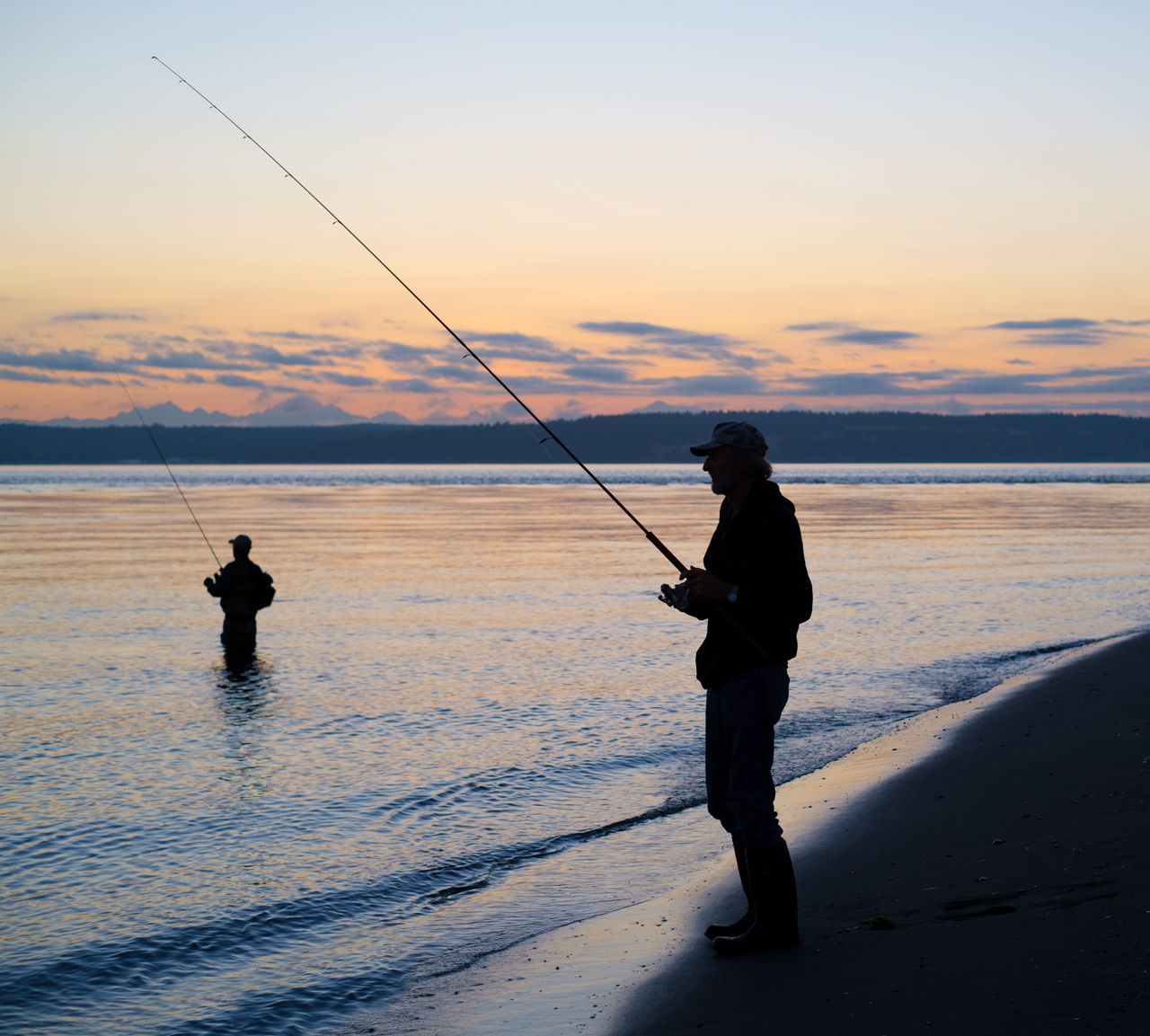
Yeah, you have a point about the darkness of the sand. I mean, there's some detail in there (you can see the fisherman's footprints) but I can see that it does create an attention sink. Lemme goof with it. |
Jan 27th |
| 60 |
Jan 21 |
Comment |
Hey Jane. There you go with that science fiction Photoshop stuff! ;)
Just joking. I have been dabbling in Ps, on your recommendation. I did a macro photo stack the other day, my first. Results? Well, let's just that that a poorly composed photo with a large DoF is not better than a poorly composed photo with a narrow DoF.
Actually though, it had never occurred to me to add stuff in editing. Man, that's another thing on my list of to-dos!
As for the halo around the 2nd fisherman, I didn't mess with exposure or color at all. I did some cropping (cropped out two other, less distinct, fisherman on the right) and some minor spot removal but that's it. I think if there's any halo at all (I don't see it) it might be due to the angle of the lightening sky and the water.
Good call re: position of the head and the eastern shore of the sound. Not really a problem, IMHO, but certainly not ideal. Now, if I could only incorporate that check into my habits EVERY FREAKIN' TIME I THINK I WANT TO PRESS THE SHUTTER RELEASE!!! ;) |
Jan 24th |
| 60 |
Jan 21 |
Reply |
OK. Understood. And I get your point. I had anticipated that you might be trying to create living space to the front of the fisherman, but I guess that's not really the point. Actually, I liked the arc of the of the sand in the bottom right (although I'm not sure it adds, and it really is unavoidable), and was kind of proud of the rod's leading line, coming right out of the corner of the image. Still, there's always room for improvement and I think this image is about as good (perhaps not good enough) as it's gonna get.
Recomposing left changes the image entirely, in that you're no longer looking into the sunrise (so it loses all it's color), and instead of looking across the sound, you're now looking at a much closer island, which I think probably would create merger issues.
But, hey, you get what you get. For my purposes, this has been a productive discussion. When you create something, especially if you like it, you're not really able to look at it objectively. That's why we have Digital Dialogues, which brings in people who don't have an emotional attachment to the image in order to give you that objective review. So, thanks Diane.
|
Jan 22nd |
| 60 |
Jan 21 |
Reply |
Dianne, what are your thoughts re: cropping the right, and opening up on the left (I have an idea about the intent, but I don't want to lead you)? What does that do for the image?
I think you're right re: wanting to move the head from the land mass, to avoid potential merger issues. IMHO, because of the the contrast between the head, and the land, and because of their different focus qualities, there is no real merger. BUT, you are absolutely right. It would be a better image if the head had water as a backdrop, and not the gray land mass. Good catch, and a good lesson for me ...for the 147th time: Look at your background.
It reminds me of something I heard which is (counterintuitively to the sophomore photographer, I think), "don't feel the image. See the image." You (I) need to divorce yourself from all the things you're feeling about what's in the frame, and actually SEE what's in the frame and take control of it. Many things complicate this, including an actively changing scene, and what's going on in your own head. Nevertheless, I think that this is an axiom to be internalized, and a skill to be learned.
Thanks for a great, and accurate tip. |
Jan 21st |
| 60 |
Jan 21 |
Comment |
Happy New Year Richard!
Wow. What can you say about that sky? This rivals the stuff I used to see while living in the Mojave Desert (which consistently had the best sunsets of anywhere I've ever lived, or been). Blues and oranges complement each other perfectly, and produce and active scene above that crisp waterline. The silhouette (well done, so as not to detract from the sea/sky) of the pier adds some cool shapes and lines. Ocean ripples add texture and repetition. Pool reflects the wonderful sky, which you did an ace job of exposing, without blowing out.
I think you might be able to get away with cropping up from the bottom, in order to get rid of that mud in the bottom right corner. I don't think you'd lose anything critical. Just an idea... |
Jan 13th |
| 60 |
Jan 21 |
Reply |
Yeah. You're right Dianne. I don't know what happened here. I wrote my comment on Emmy's image. And, when I checked out Emmy's image a minute ago, I also scratched my head wondering where my comment went. I haven't had a drink in weeks. Maybe I have dain bramage. Anyway...
Two thumbs up on the use of intentional camera motion (ICM). I saw a presentation from Dinah Satterwhite (look her up) last year, and then went out to try it myself, but was never able to produce anything that made me go "wow." On the other had, I think you've done a pretty good job of sloshing everything around, while still retaining recognizability. I mean, there's detail in there, but then there's this stretching of reality as well. Colors and exposure work. Focus is good, which gives the detail, but then motion gives us soft blur. Very interesting.
I would also recommend looking up Don Paulson (a member of my club). He uses ICM a lot, and has a very (IMHO) distinctive style. He gave a presentation on it, not too long ago. If you're interested, I can see about scrounging up a copy of the powerpoint for you. |
Jan 13th |
| 60 |
Jan 21 |
Comment |
Hi Emmy, Happy New Year!
Boy, I thought I commented on this already but I guess I didn't (it was kind of late when I did). Anyway...
Great subject matter. Mountains, light, and clouds make about the most charismatic images I can think of. Good eye. I like the pano aspect too which really shows the grandeur.
I think if it were me, I'd crop in from the left (so as to remove the dark jetty on the left), and in from the right (to just left of the buoy). In both cases, I don't think you lose much mountain, but get rid of potential distraction.
After that, I'd flatten the horizon, which I think (not sure) you can do in LrC with the Transform tool.
And after that I'd just create some contrast, which I'm thinking would create detail in the clouds, and the mountains.
To be honest, I have bunches of kind of similar photos, of the Olympic range, from across the Hood Canal. The challenge of those photos (for me) is that the flat (topographically) foreground means that you have no foreground or mid ground interest. I've seen folks talk about long focal length landscapes, so maybe I need to learn more about those in order to tackle this worthy subject.
Keep up the good work Emmy. |
Jan 13th |
| 60 |
Jan 21 |
Comment |
Happy New Year Diane!
Wow. What powerful subject matter. I don't think it get's much better than clouds and mountains and light. I totally get the urge to panorama this; it's just such an...imposing environment...keen vision on your part.
This is just me, but I've been staring at this for five-ten minutes and I would like to make three spitball suggestions:
1) Crop in from the left (so as eliminate that dark peninsula), and in from the right (to just left of the buoy). I'll miss the clouds on the left but there's not much mountain, and everything on the right of the buoy is indistinct.
2) Flatten the horizon. I think the LrC Transform tool might be able to do it (but am not sure)
3) Add contrast...to everything. Use a graduated filter from the top to drop exposure which will add detail to the clouds. But maybe just adding contrast to everything will add detail. Frankly, I'd start with Dehaze. That alone might do it, and I think it'll add color to that almost-clear mountain pass on the right.
Hell, like I said, I'm just spitballing, but anything that would add detail would be a bonus, to me anyway. I don't know, what's your level of satisfaction with it? Where would you like to take it?
D
|
Jan 11th |
| 60 |
Jan 21 |
Reply |
Which mode? Hmmm. Good question. Frankly, don't remember, and can't locate that in my metadata (LrC metadata is pretty good though). But, if I was a betting man, I would guess that this was in fact Manual (right after I rant about using automation, right?). The reason I say this is that my ISO is obviously in the manual range (200 is base), I'm not at my fastest aperture for this lens (f1.8), and ss is kind of high for these conditions...but that's because I wanted something non-standard; a properly exposed sky, and an underexposed subject (while still retaining some detail). I think this is a good example of when you can't rely on automation, and have to be able to go manual. Thinking about it, I could've achieved the same thing using full automation (decouple auto-exposure from auto-focus, expose for the sky, focus on the subject, leave ISO in auto), but it was more expeditious just to spin the dials (especially on the Fuji x-series, which has lots of nice physical controls).
Re: recropping, I checked, it ain't gonna happen. There is nothing to the left of the fisherman. But, thinking about it, I probably framed this image in order to a) point most directly into the rising sun, and b) avoid Whidbey Island instead of looking all the way over to the east side of the Sound. So, your idea might produce a nicer image, but that's all I got Man! ;) |
Jan 6th |
| 60 |
Jan 21 |
Reply |
Hey Bernie, Glad you got something out of my screed. With regard to (WRT) cropping, I like the first better, honestly (all the pretty lights). I suggest cropping up from the bottom only, enough to cut out that hole.
WRT which mode to use, there is a myth (IMHO) floating around out there that anything but Manual should be avoided. If that were true, we'd have pilots flying jumbo jets with a magnetic compass and a paper map, daylight only, and communicating with light signals instead of satcom. Have you ever noticed that nobody tries to tell you that you need to get off autofocus? IMHO, the goal is to know HOW to use the automation in your hands, so that you can get the shot, instead of watching Sasquatch fade into the forest while you fiddle with your ISO dial. Knowing what the automation can do, how to put it to use, and when to resort to manual override is the modern photographic challenge. When you're busy thinking about how to drill down into your menus to deal with the exposure triangle, you're not scanning your background for annoying highlights. Automation can't do everything, but it can do a lot. Have you read my rant on exactly this top in the bulletin board? Know your equipment and make it work for you, IMHO. |
Jan 6th |
| 60 |
Jan 21 |
Comment |
Happy New Year Jane!
Interesting shot! I definitely get the sense of motion that I think you were looking for, by stretching your ss to 1s. I think the fact that this is an image of foam, and not just liquid water, adds a dimension and quality you don't see all the time. And, the juxtaposition of the motionless rocks in the otherwise chaotic and flowing foam is kind of striking. This seems like it was a relatively small piece, so I commend your eye for locating the beauty in the small and unobtrusive, which I think is an art.
You know, truth be told, after looking at this awhile, I think I like the top 2/3 of the image best, since the appearance is just a little more familiar to me, and I like the grey streaks better than the...cotton candy white of the lower right corner. But, that's just a personal preference and not a statement about the technical qualities of the shot.
Also, I can't tell if I want to see more of what's to the right (since that rock on the right leads my eye in that direction), or less (in order to concentrate on the central rock). I dunno.
I think your exposure of the water/foam is spot on, which is not an easy task given the dynamic range of the image. At first I wasn't sure how much detail you'd achieved in the rocks, but then I rotated my laptop screen and it all popped out. (Note to self: Do this stuff on your desktop monitor, or view it on two different screens.)
P.S. You must have had this on a tripod. Did you get it salty/sandy? I've been doing some research on tripods that can handle the marine environment, and am not sure I've come up with a good answer. Perhaps you just have to find that old, thrasher tripod that you are willing to sacrifice, and then rinse it a lot. But, frankly, I stress about dropping my camera into the drink too. Maybe I'm just not cut out for the high-stakes game of shoreside photography.
|
Jan 5th |
| 60 |
Jan 21 |
Comment |
Happy New Year Bernie!
Frankly, this is a a nice shot. I think it captures your intent, and is of course topical, so has good impact. Your DoF is appropriate in that items just a short distance behind Santa's face (like Snoopy) are beginning to soften. Colors look good but there's still a warm caste. Santa is well-framed, with living space on the left. I don't see any black clipping, and the highlights (bulbs) should be highlights, but cast nice studio lighting on Santa. Well done really.
That hole through the trees in the lower left seems in congruous in color to me, but I'll bet it could be cropped or cloned out pretty easily.
I'm surprised that sharpening was required, given that it's f10 and on a tripod. Frankly, that might be working against you a bit, since instead of letting things in the background go soft, it probably sharpens them, thus grouping the subject (Santa) and the background. I'd be interested in seeing the sharpened version with the unsharpened version, for my own education (I've never worked with Topaz, but hear great things).
P.S. If you're in Manual mode, it doesn't matter what metering mode you're using. The metering mode comes into play by selecting the points in the frame that the camera will use to determine ITS idea of what exposure should be. If you're in M mode, you bypass all that auto-exposure stuff. The camera deserves not credit in this case. Having said that, I like to use all the tools available to me, and so probably would've been happy with A Mode, since you I only care about my DoF, and not ss (since I'm on a tripod), and am willing to let the camera manage that. Just a tidbit... |
Jan 5th |
7 comments - 5 replies for Group 60
|
7 comments - 5 replies Total
|