|
| Group |
Round |
C/R |
Comment |
Date |
Image |
| 29 |
Feb 24 |
Comment |
A fantastic job Ron. I've been there but not with a digital camera and I was always running from the subway to the trains to travel to MA from NY. Oh Yes, that was in summer of 1969 and I was wearing Navy whites and crazy hot. You were perfectly allowed to use Topaz abstraction in the windows. A great idea. Sorry for stopping by the DD late Ron. |
Feb 25th |
| 29 |
Feb 24 |
Comment |
I appreciate everyone's comments and edits.
|
Feb 25th |
| 29 |
Feb 24 |
Comment |
Well done Gunter. I apologize for being late this month. A great job getting everything lined up . No snow this year? We have had a wet but very little snow in southern NH this year. Either horizontal or vertical work for me. You did great with having the benches being placed well in the image. |
Feb 25th |
| 29 |
Feb 24 |
Comment |
A fantastic idea Karen. Never tried one myself. Patience isn't my strong point, But you have done a wonderful job here. Well done.
Sorry for being late to the DD this month. |
Feb 25th |
| 29 |
Feb 24 |
Comment |
I agree Judy, it is a beautiful door and I've never seen this image before. I would think that you could take the door and vault in 1 frame and use your special spiral treatment on it. Sorry for being late to the DD this month. |
Feb 25th |
| 29 |
Feb 24 |
Comment |
Hi Elaine. I apologize for coming late to DD29. I do appreciate your work on the lightpad/box. I can't say that I have done anything like this. I also don't remember seeing buds on the Canna Lilies. Great DOF from your R5. No suggestions. |
Feb 25th |
| 29 |
Feb 24 |
Comment |
Hi Tim. Sorry for being late to the DD. Another Fantastic street photo that you just happened to be fortunate to capture. I do favor your whiter version of the beard and the bag. Great job. |
Feb 25th |
| 29 |
Feb 24 |
Comment |
And that's the florist had them packaged and stuffed in between other bouquets. I cut out many but thank you for finishing the crop and improving the heart. That's team work. |
Feb 7th |
| 29 |
Feb 24 |
Comment |
That's Excellent Karen. I don't know where to click to even make the heart border! |
Feb 6th |
| 29 |
Feb 24 |
Comment |
Thanks Elaine. Here is the original. I generally need to do some cloning to remove bar codes and spots without color or texture. Have fun and glad you liked my image. |
Feb 6th |
 |
| 29 |
Feb 24 |
Comment |
Thanks Ron
|
Feb 5th |
11 comments - 0 replies for Group 29
|
| 62 |
Feb 24 |
Comment |
Thanks Israel. |
Feb 19th |
| 62 |
Feb 24 |
Reply |
Pete, I like 97% of what you have done. I think that some of the piling (posts) and stones are a tad over exposed. Understand you might of done that to get the viewers eyes to rest there. I have no problem with exposure on the building. |
Feb 18th |
| 62 |
Feb 24 |
Comment |
Mark, I Love all the tones and details you captured in these buildings. The dark sky and the sun behind the building are just perfect. |
Feb 8th |
| 62 |
Feb 24 |
Comment |
Emil, you did a great job planning this out. I might of been one of those that said too much blank sky but since it was a foggy morning and the lighting looks all natural, the dark sky at the top forces the viewers eyes down and then the subject becomes clear. The empty field and backstop. Well done. |
Feb 8th |
| 62 |
Feb 24 |
Reply |
Hi Mandy. Beautiful pose and exposure. I probably would have used your zoom lens differently than you did. You didn't note the mm that it focused at. I would have stepped back (assuming that I could) and shot at a mm (maybe 200mm) to keep the model the same size as you shot her. This would of softened the light and shadowed areas and distractions in front and behind the model. I don't feel that the details on the other side of the stream are adding anything to the image. Your choice of the 1/400 sec shutter speed on the water is just fine. |
Feb 8th |
| 62 |
Feb 24 |
Comment |
Thanks Emil, I'll try to fix it. |
Feb 8th |
| 62 |
Feb 24 |
Comment |
Well done Pete. Arches and columns are perfectly aligned leading my eye to the statue at the end. The edits along the side walls help bring the viewers eyes along the path. No suggestions. |
Feb 3rd |
| 62 |
Feb 24 |
Comment |
Excellent job Israel. Your journalistic talents show again. A powerful but respectful (as you didn't place the girls photos in center) image. Maybe just my computer, but I think it would look better with a "tad" increased exposure. Only white is on the 2nd floor wall and that could be darkened some if it gets blown out. Understand you may of wanted to downplay the details in street and around the house. But I'll leave that detail up to you.
Thanks for sharing Israel
Bob |
Feb 3rd |
6 comments - 2 replies for Group 62
|
| 80 |
Feb 24 |
Reply |
Nadia, I hope you agree that background just looks more natural. Well done. |
Feb 19th |
| 80 |
Feb 24 |
Comment |
Thanks Nadia. I appreciate your thoughts and words.
Bob |
Feb 19th |
| 80 |
Feb 24 |
Reply |
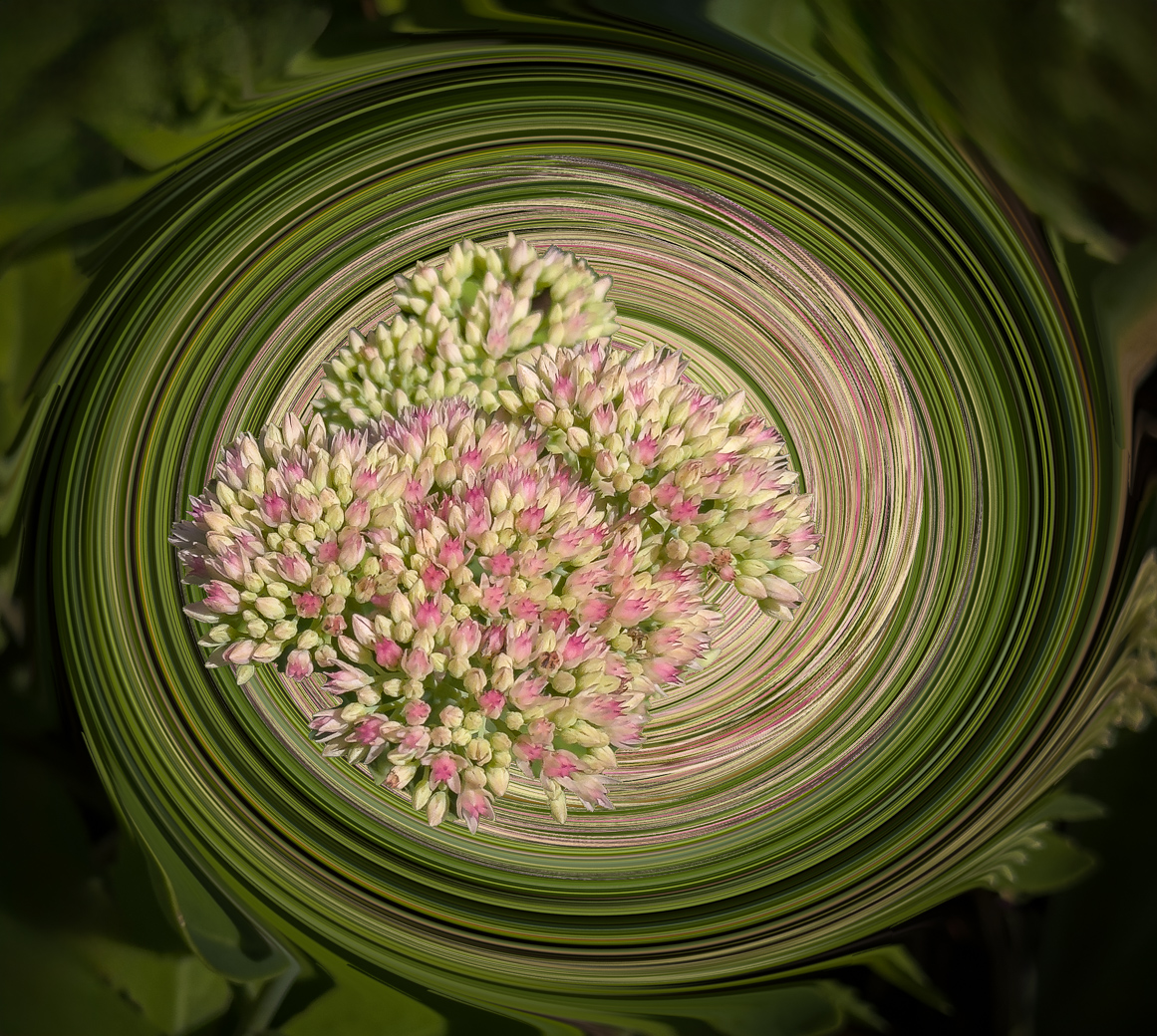
Still could not find the way to get Twirls to the edges, other than cropping. See if I improved it or made it worse. |
Feb 18th |
| 80 |
Feb 24 |
Reply |
Thanks Kamal for your kind words. |
Feb 18th |
| 80 |
Feb 24 |
Reply |
I recreated it again with the center off center. Short of time to crop and enlarge the best part of the flower and give it another Twirl. See my redo. |
Feb 18th |
| 80 |
Feb 24 |
Reply |
Doug, I thought I needed to apologize to you about using Ps, because I used Swirl and that is term that Topaz Studio uses. I apologize for using the wrong Swirl/Twirl term. Ps uses Twirl so I've recreated the image and addressed the distractions on the edges. Yes, done in Ps and actually shot on my 14 Pro phone. In Ps Select to select subject and perhaps should have cropped more before selecting. After subject is selected the select-Inverse is then available to select the opposite of your first selection. It comes in handy and I use it quite often to select the other way in both Ps and Topaz Studio. Here is my redo with more Twirls with Remove tool and Vignette. |
Feb 18th |
 |
| 80 |
Feb 24 |
Reply |
Thank you Jacob |
Feb 15th |
| 80 |
Feb 24 |
Reply |
Thanks Rich |
Feb 15th |
| 80 |
Feb 24 |
Comment |
Kathryn, another beautiful background that you have made. However, since your flower is past prime I might of tried a Topaz Impressionistic look to remove the dark area on the first row of petals and the spots on the petal to the right. I would have masked the water drops to keep them and I would have kept the stem green. What would I do with the background. Hmmmmm. Copy yours? Really, since the original background is dark, that's probably what I could do. I know we are not going to agree on most edits and that fine with me and hopefully with you. |
Feb 8th |
| 80 |
Feb 24 |
Comment |
Kamal, I agree that the center flower and the bud in front and behind add to the image. Like Kathryn, I feel the bud to the rear needs to be cropped off or removed as it adds nothing to the image and its bright top is distracting. I'd also use the remove tool or healing brush to remove those two partial black bugs from the flower.
Great shot. |
Feb 8th |
| 80 |
Feb 24 |
Comment |
Nadia, I find this Iris just beautiful and a great flower to photograph with those nice open petals and dark veins. Much nicer than our bearded Iris we have in the northeast, US. I agree that the background needed to be less distracting. I like the tones of your Ps textures, but would have tried to remove the bright vertical that is behind the highest part of the blue throat. I couldn't do the multiple textures as you have done but would of chosen subject and then background and darkened and softened to accomplish something different but not necessarily better than your version but it would have those bright 5 or 6 lines in the background. No changes to the flower, that just perfect. |
Feb 8th |
| 80 |
Feb 24 |
Comment |
Jacob, while my thoughts are different from Kathryns we both can both be wrong and you as the artist can be correct. I like the flower's color (saturated colors included) and the water drops help to make the image unique. I would have used Ps and used the remove tool as it does an excellent job. I would remove both the dark objects on the left side and probably the past leaf on the left also. I would then crop off the bright areas areas in the water or you can use the remove tool for removing the bright areas in the water. Learn the removal tool it will be your best friend for removing distractions. Just my ideas, Kathryn is great with hers also. |
Feb 8th |
| 80 |
Feb 24 |
Comment |
Rich, please check out Protea image at Doug Walters on DD80. Hared to believe that these are the same plant, but because he peeled away the sides and did closeup it could be.
The difference between your original and final where there is more hair especially in the center of the flower? I do like the purple and find the Whitetish center attracts my eye.
|
Feb 8th |
| 80 |
Feb 24 |
Comment |
First I had to Google "Protea" and found it to be native of Africa. Kathryn talks of "petals" but these eyes are not seeing anything looking like a petal. I are perhaps others wonder what is a petal and what are we dealing with here? Doug, it is nice and sharp, Nice colors, composed well, but no idea of scale. Doug, I'm trying to NOT side with your wife. Are these hairs close to Rich's Protea? Thanks |
Feb 8th |
| 80 |
Feb 24 |
Comment |
Thank you Kathryn.
|
Feb 7th |
| 80 |
Feb 24 |
Comment |
Kathryn, I'm not a big symmetry fan and I think that making the twirls all the way to the end would eliminate leading lines "on ramp" that the image now has. Could I crop a bit more, probably yes, but I'd have to start again from the beginning :-(
Thanks for you input. |
Feb 6th |
9 comments - 7 replies for Group 80
|
26 comments - 9 replies Total
|









































































































































































