|
| Group |
Round |
C/R |
Comment |
Date |
Image |
| 29 |
Dec 23 |
Comment |
Thanks Tim, glad you liked it. |
Dec 17th |
| 29 |
Dec 23 |
Comment |
Gunter, my apologies for arriving late. You have done a very good job with this composite. I don't let the rules ruin my day, I just follow to the best of my abilities and "fudge" like many of the others. Your sun is done pretty well as I wasn't sure it was real or not. Can be shot naturally at sunrise or sunset. Keep up with your good work. |
Dec 15th |
| 29 |
Dec 23 |
Comment |
Well conceived and executed Karen. I Love the curves and that you didn't cut off the little finger holder that allows the player to hold the horn and have the 3 fingers tips free.
|
Dec 15th |
| 29 |
Dec 23 |
Comment |
Good job seeing the possibilities for this image Elaine. Cropping comes down to the artists desires. Yes, something needs to be cropped but many possibilities and it's really up to you to see where you want the viewer to connect with the image.
|
Dec 15th |
| 29 |
Dec 23 |
Reply |
Understand Ron, I've done the same thing. No harm to have it checked out. |
Dec 11th |
| 29 |
Dec 23 |
Comment |
Ron, I hate to say that this image is lacking. Maybe you have others? Looks like you are doing what I and many others are doing and going back to older images and using new masking filters and finding images long forgotten and some that should have been placed in the round file. |
Dec 10th |
| 29 |
Dec 23 |
Comment |
A Really Great Image Judy. With all the curves I do, I haven't thought of something like this, but then again my city trips are virtually non existent. Great seeing and editing. Thanks for sharing. |
Dec 10th |
| 29 |
Dec 23 |
Reply |
Thanks Judy. Glad you are having "fun" experimenting. I think it expands our vision into other possibilities. I'm generally not finding any of those glass filters to my liking. I agree they look good small, but when they are enlarged it looks a little like the "grunge" filters where the the details and colors get lost. I think it's just me and the images I pick. As an example I've tried this abstract filter many times and this is the first time that I could say "Nice", that's great. |
Dec 10th |
| 29 |
Dec 23 |
Reply |
Thanks Gunter. Yes, I thought about flipping but thought, Maybe Gunter has some ideas. I like your centering the shore line. That Topaz filter worked so perfectly there was no need to go crazy. |
Dec 10th |
| 29 |
Dec 23 |
Reply |
Thanks Karen. It just needs one of your beautiful elk or moose in the water. |
Dec 10th |
| 29 |
Dec 23 |
Reply |
Thanks Elaine. I didn't know what I was going to do with it when I took it, but have seen some trees used to make window frames like this. |
Dec 10th |
| 29 |
Dec 23 |
Comment |
Great PJ image like others you have done. Nothing could be done to the trees behind. Thanks for sharing Tim. |
Dec 9th |
7 comments - 5 replies for Group 29
|
| 62 |
Dec 23 |
Comment |
Israel, it's Great to see you are doing the photo journalism type shots. A beautiful scene that you captured and agree the masking tools can really bring images to life.
Well done, Israel. |
Dec 10th |
| 62 |
Dec 23 |
Comment |
Bunny, another great find from one of your trips. I prefer the studio lighting vs some of the darker places you photographed. While I find that new Blur mask in Lightroom is great for some scenes I prefer Bunny's sharp view. Bunny, I have no problem showing all the clutter as it is parts of their job for many many years. |
Dec 10th |
| 62 |
Dec 23 |
Comment |
Mark, a great job of looking up and having the wide angle to capture the image. A very good job of editing to bring some vibrance and detail to these buildings. Well done. |
Dec 10th |
| 62 |
Dec 23 |
Comment |
Emil, A nice town, or at least what you have photographed. I did a small town business district, not much different in size than yours and I shot it on a Sunday morning with no cars. I believe it made for a clearer view of the architecture without the cars. It didn't have the nice painted building like your Tom-Boy building. Also a night shot since it does have older style lights may be great, but not sure how many miles down the road from you place. Yes, I probably would have lightened up the sky some more. Great find. |
Dec 10th |
| 62 |
Dec 23 |
Comment |
A very nice image, Mandy. Composition shows much detail and a great choice of the wide angle stop and shutter speed. From what I've heard that camera will give good results to much higher iso. The wide angle works well for slow shutter speeds and the 1/60th gave you results sharp from front to back. I think Emil's vignette is a great idea. |
Dec 10th |
| 62 |
Dec 23 |
Comment |
Well done Pete. The 400mm really pushes everything together. Your jogger does add scale but the flags do also and to managed to have most of the flags flying beautiful but virtually no ripples on the water. It might helpful to take a current version with the assumption that they haven't started another construction project. |
Dec 10th |
| 62 |
Dec 23 |
Comment |
Thanks Bunny. I prefer the color versions myself but some like this one, really work well in B&W |
Dec 10th |
| 62 |
Dec 23 |
Reply |
Thanks Mr Corn Man. There is no such tree as a "fur" tree. Perhaps you're referring to "fir" tree, but don't see any in this image. The tall trees that I cut the tops off in in the back of the image. Or the colored trees make darker like Pete did?
|
Dec 5th |
7 comments - 1 reply for Group 62
|
| 80 |
Dec 23 |
Comment |
Thanks for your comments Doug. I agree. Thanks for stopping by :-) |
Dec 22nd |
| 80 |
Dec 23 |
Reply |
Yes it was a good experiment. Unfortunately, I do not have enough time to do as many as I desire. Our house project is still ongoing. |
Dec 16th |
| 80 |
Dec 23 |
Reply |
Thanks Rich. I appreciate your comments and yes that bright petal in the background needs to be gone. |
Dec 13th |
| 80 |
Dec 23 |
Reply |
Thanks Nadia. Understand some folks don't like petals of flowers cropped off while some of us go either way depending on the image and distractions behind. Artists' choice. Merry Christmas. |
Dec 13th |
| 80 |
Dec 23 |
Comment |
Doug, I think the flower is excellent the way it is. You captured all the edges in great sharp focus. I think the orange cream background works just fine, but then again I don't do much with textured backgrounds. Well Done. |
Dec 11th |
| 80 |
Dec 23 |
Comment |
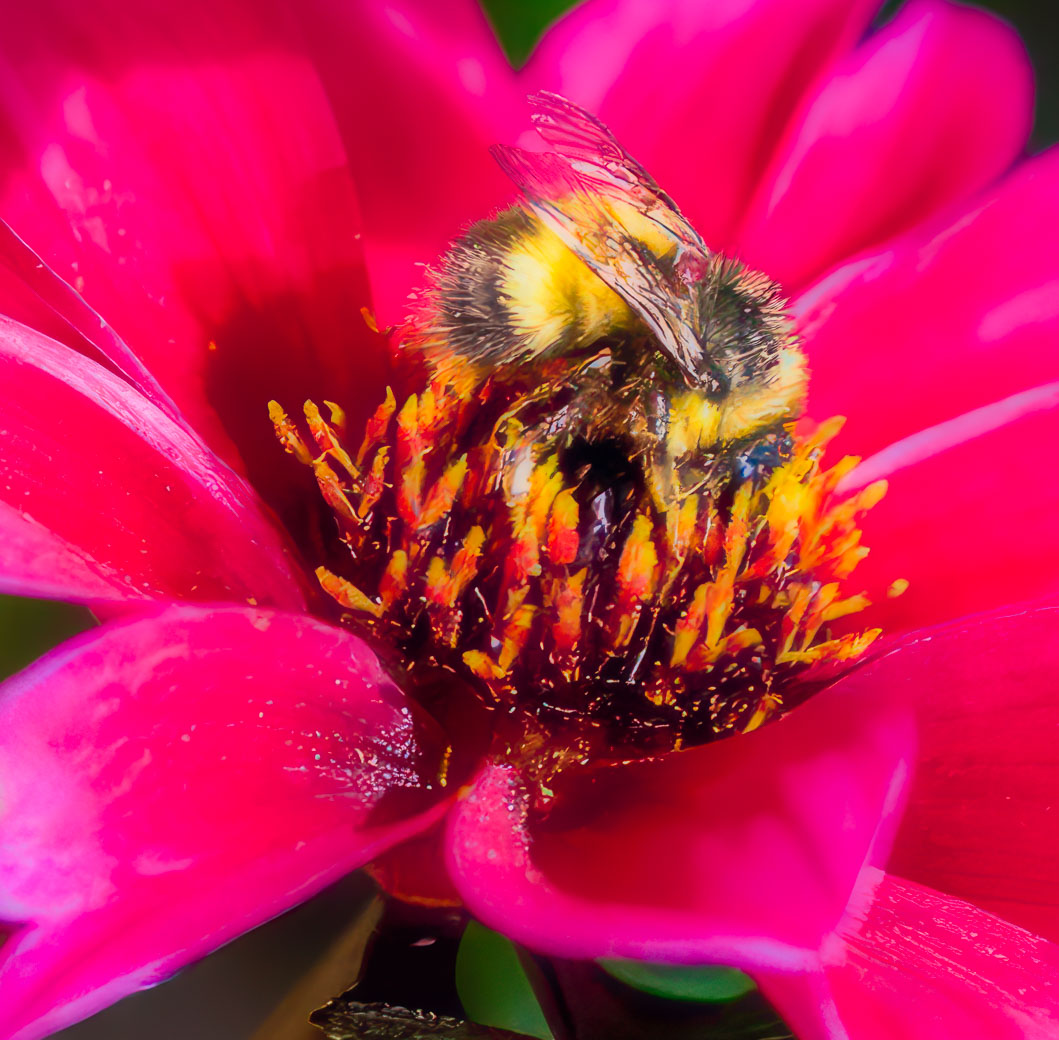
Glad we both got something from this. The masking software is still not good enough to capture the fine bee fur. The note about the flower stem is true but I have been dinged several times in last 6 months for leaving part of a stem so that the flower is not floating. I could have removed it but kept it for that reason. Keeping the flower and bee sharp would have worked if that is what you wanted.
Bob |
Dec 11th |
| 80 |
Dec 23 |
Comment |
Kathryn, here is my attempt to get the edit you were looking for but by keeping the bee and center part of the flower sharp. They are relatively sharp and I personally would have tried to make something using that sharpness. That's what I tried for. Used Ps to "remove" the distractions, then in Topaz Studio where I made a mask of the bee and used the glow filter to soften the flower-reds. I won't be offended if I missed the target. I believe that you didn't use a mask to remove the bee and the flower center from the washed out effect edits. Your bee and flower center are sharp and well exposed. Blame the washing effect in my mind. Hope I have contributed. |
Dec 11th |
 |
| 80 |
Dec 23 |
Comment |
Rich, this is a great example of creating creatives and or abstracts. I have seen this effect when using blending (not sure what blend yet) but you've lighten the fuse and I'm going to my catalog to find some candidates. I agree with your edits,(those brighter areas bring your eyes down to the center)but like Kathryn's also (removing outside bright area and bring your eye to the center directly. So I make multiple versions, let them ripen in the catalog and come back months later to determine my favorite. Thanks for sharing Rich. |
Dec 9th |
| 80 |
Dec 23 |
Comment |
Kathryn, this is a nice image. If you would send along the original, I would give it an edit, maybe with or without the washed out look. When it comes to living nature, like bees, I tend not to make them creative (except for bigger insects like butterflies). I defer to you about the washed out look, as you can attest I like vibrant and sharp. I am lacking the creative editing like you have performed. |
Dec 9th |
| 80 |
Dec 23 |
Comment |
Jacob, a beautiful flower that my "Picture this-Plants" identifies as Society or wild garlic that is not native in continental US. The AI photo blur has limitations and therefore was not able to really blur your background, however, you could have selected subject then background and darkened the background. Reduced color along with the blurring would go a long way to removing distractions. The edits you did to the flower really help the flower. Thanks for sharing. |
Dec 9th |
| 80 |
Dec 23 |
Comment |
Thanks Kathryn. The image was shot in full sun from what I can determine. I understand that burning around the flower will remove distractions, but on the other hand, the flower won't be grounded and might look like it's floating in space. I tried to split the difference. Appreciate your comments. And a Merry Christmas to you and your family.
Bob |
Dec 9th |
| 80 |
Dec 23 |
Comment |
Kamal, I find your pink rose to be of fantastic color, sharp and I love the details in the veins you achieved on the rose petals. See how the background is pleasing to look at, with the exception of that in focus leaf on the bottom left side side. I would use the Photoshop remove tool, (not sure if available on CS6) or a blur tool to get it out of the same focus plane as the flower. Another option is to carefully remove the leaf. Believe this is a shrub rose and 1 leaf won't be missed. A great job, Kamal |
Dec 9th |
| 80 |
Dec 23 |
Comment |
Wow, what beautiful flowers and the background is really beautiful. Composition is excellent and depth of field great. Can't think of any suggestions. |
Dec 5th |
10 comments - 3 replies for Group 80
|
24 comments - 9 replies Total
|









































































































































































