|
| Group |
Round |
C/R |
Comment |
Date |
Image |
| 29 |
Jan 23 |
Reply |
Thanks Karen. |
Jan 15th |
| 29 |
Jan 23 |
Comment |
Thanks Judy. I agree. Yes, probably Gaussian Blur. I didn't take the time to edit |
Jan 15th |
| 29 |
Jan 23 |
Reply |
Gunter, I just went back and looked as I remember taking multiple. I took 13 images and 13 seconds from start to finish. None were perfect as the right wing remained out of focus. I didn't dare change focus to that wing and quite frankly I wasn't sure what I had as I didn't take the time to peek at the preview. Thanks for your kind words. |
Jan 14th |
| 29 |
Jan 23 |
Comment |
Thanks Tim. Butterfly had just landed and movement involved also. |
Jan 12th |
| 29 |
Jan 23 |
Comment |
Tim, if you shot it in Raw, try a trial of Topaz photo. It combines their 3 programs using Ai and does a great job. Another benefit is that it saves the files as a .dng file.
|
Jan 11th |
| 29 |
Jan 23 |
Comment |
Gunter, this is a great find in my book. I Love the shape of the pond and the surrounding details. My only suggestion, if it were mine, would be to open up the dark tones in LrC tone curves or by selection of the inverse of the sky to bring out the colors in the background and foreground. Sky is just perfect. Great SEEING. |
Jan 9th |
| 29 |
Jan 23 |
Comment |
A very nice closeup of the owl's face, Ron. Nice detail in eye, beak and feathers. Yes, you missed an ear, but you have the story telling eye in the perfect position.
Well done.
F?WE |
Jan 9th |
| 29 |
Jan 23 |
Comment |
Another great wildlife photo from RMNP. So many great photos of wildlife you get there. The eyes are sharp and upper part of the fur is adequately sharp and the snow adds to the story. I just wish the nose area was sharp. You didn't give us any data, but higher iso could have given you greater DOF. |
Jan 9th |
| 29 |
Jan 23 |
Comment |
Nice image Judy. Great lighting, exposure, sharpness and composition. My only comment would be to not try to hand hold in these circumstances. At a minimum the iso should be set at 400. At the same F10 that would give you 1/500 sec and that come eliminate any jitters you may of had when shooting bison at this distance. The higher speed could product more detail in the faces of the bison. |
Jan 9th |
| 29 |
Jan 23 |
Comment |
A very nice image Tim. Good Light, composition and its sharp. I must comment on your editing and the background. With your lens and camera combination I'm unable to determine how the distracting noise or editing remnants produce the distracting elements behind the Stag's antlers above and particularly from the area of the white line and above. ISO 1100 should not have caused the background noise? You didn't include your original that might explain what happened. Did you use the tools in the latest LrC and or Ps? I would have liked to capture such an image.
|
Jan 9th |
| 29 |
Jan 23 |
Reply |
Thanks Stuart for stopping by and making edits. I agree with them all. But..you spoiled it for others. LoL |
Jan 6th |
8 comments - 3 replies for Group 29
|
| 42 |
Jan 23 |
Comment |
Hi Stuart, I find the shape of the window frame to be most interesting. I think the transfer tool in Ps would allow you to make the sides and grilles perpendicular. I'm hoping the top of the window frame doesn't get cropped. And how about the negative dehaze filter to remove some of the distracting details in the lower portion of the image. |
Jan 6th |
1 comment - 0 replies for Group 42
|
| 62 |
Jan 23 |
Reply |
Sorry for being slow on the reply LuAnn. I'm glad you were able to make it. Tony does a great job. I've not thought about it because the clouds would look unnatural like an abstract. If I get a chance I'll get creative with this image.
We now have a move-in date 2/9 so I've been trying to get everything organized while needing to buy stuff. Needed to spend some time today to shovel out after 16" of snow that 's just ending. The vacation has ended.
Oh and thanks for the snow.
Bob |
Jan 23rd |
| 62 |
Jan 23 |
Comment |
Hi Mark. I understand that AI images will be an issue that PSA has to deal with down the road but they have to deal with simple sky replacement in some categories before that. No AI in this image. My image is from my D300 in May of 2008. No other pics from that time frame so I have no idea where it was taken. |
Jan 23rd |
| 62 |
Jan 23 |
Reply |
Thanks Israel. I always appreciate your comments.
|
Jan 11th |
| 62 |
Jan 23 |
Comment |
A perfect sky for your image Israel. It adds so much depth and interest to the image that the viewers eyes need to follow the towers, wires and clouds into the distance.
fantastic. |
Jan 9th |
| 62 |
Jan 23 |
Comment |
A great capture Mark. I Love the expression on the coach's face, it tells the story. I agree with Emil that the big watch was distracting the views from the coach's eyes.
Fantastic image. |
Jan 9th |
| 62 |
Jan 23 |
Comment |
Pete, Yes, this is a beautiful image with lots of details in the Cathedral brought forward by your processing. No suggestions, just keep doing what you have been doing. |
Jan 9th |
| 62 |
Jan 23 |
Reply |
Thanks Pete. It was difficult to find a cloud image that worked because some skies had tonality in the clouds that placed them on top of the tree branches. |
Jan 7th |
| 62 |
Jan 23 |
Reply |
Thanks Emil and Pete. I agree. But, remember the horror the first couple of times I said that I had replaced a sky. Now it is much more common, except in PSA Nature and my image could be judged a Nature Landscape. |
Jan 7th |
| 62 |
Jan 23 |
Comment |
Hi Emil. I Love slo shutter speed waterfalls. Depending on the water volume I find that shutter speeds around 1 second give the water a soft feel but with more detail and contrast within the water than you image is showing. The beauty of this subject is the artist can determine the exact look they wish. The faster shutter speed also also reduces chance of white/light water from over exposing and losing details. You have handled everything well. |
Jan 2nd |
| 62 |
Jan 23 |
Comment |
Hi LuAnn. Happy New Year to you. Don't be discouraged with Topaz 2 Studio not being updated it works on Apple Max Silicon so it should be good for 2-4 years and maybe Topaz is in the process of updating but knows it will take a while to convert to the new Silicon.
BTW, moved into NH condo yesterday so next move will be into house once the sellers move out.
Now you image is beautiful. Wish I had some images with this amount of detail that I could decorate. You might of missed a key feature of Topaz. Use the masking tools to remove that area from the filter. Copy or invest that mask when you do another filter or look. That gives you the ability to have different mask (layers) as you process. If I have not been clear, email me and we can setup a telephone call or Zoom. |
Jan 2nd |
6 comments - 4 replies for Group 62
|
| 80 |
Jan 23 |
Reply |
Thanks Nadia. I've never even considered using "field blur", I'll have to check it out.
Bob |
Jan 26th |
| 80 |
Jan 23 |
Reply |
Thanks Kamal |
Jan 23rd |
| 80 |
Jan 23 |
Comment |
Very nice edit Kamal. |
Jan 23rd |
| 80 |
Jan 23 |
Reply |
Thanks Doug, however, I downloaded your image and put it beside my version and yes it is a little softer and highlights maybe down, but my aging eyes can't discern a difference, so I agree with you 100%. Thank you for your edit and positive comments. |
Jan 11th |
| 80 |
Jan 23 |
Comment |
Hi Syed. Your Dragon flowers are actually quite pretty. I Love fine lines of the white petals and the soft yellow color. I do like the impressionistic filter you found to enhance the finer details of the flowers. Your composition is excellent and I'm at a loss to how to improve this. Well Down. |
Jan 9th |
| 80 |
Jan 23 |
Comment |
That's Excellent Kathryn. That's still much more planning than taking all the images over a short period of time and then one morning thinking, "What can I do with these images? I applaud your planning and work.
|
Jan 6th |
| 80 |
Jan 23 |
Comment |
Kathryn, upon looking at this image and the parts you composited, I feel you have done a masterful job in filling the black areas at the top and the light area at the bottom. And I didn't miss the fact that you created the image with the idea of adding the rusty pieces and creating the reflections. Not my cup of tea because I fail at the pre-visioning necessary to make this all happen. A wonderful job of picking out those rusty pieces, shooting them and compositing into the image. I can see where many viewers would consider this "fine art" because it takes the Dahlias and makes art from a flower image. I cannot think of any improvement to suggest. Well Done. |
Jan 5th |
| 80 |
Jan 23 |
Comment |
Doug, I find the leaf to be well composed, sharp throughout, natural colors, and on a beautiful textured background. I commend you for having the patience and skills to shoot and stack the 47 images to make this image. |
Jan 5th |
| 80 |
Jan 23 |
Comment |
|
Jan 5th |
 |
| 80 |
Jan 23 |
Comment |
|
Jan 5th |
 |
| 80 |
Jan 23 |
Comment |
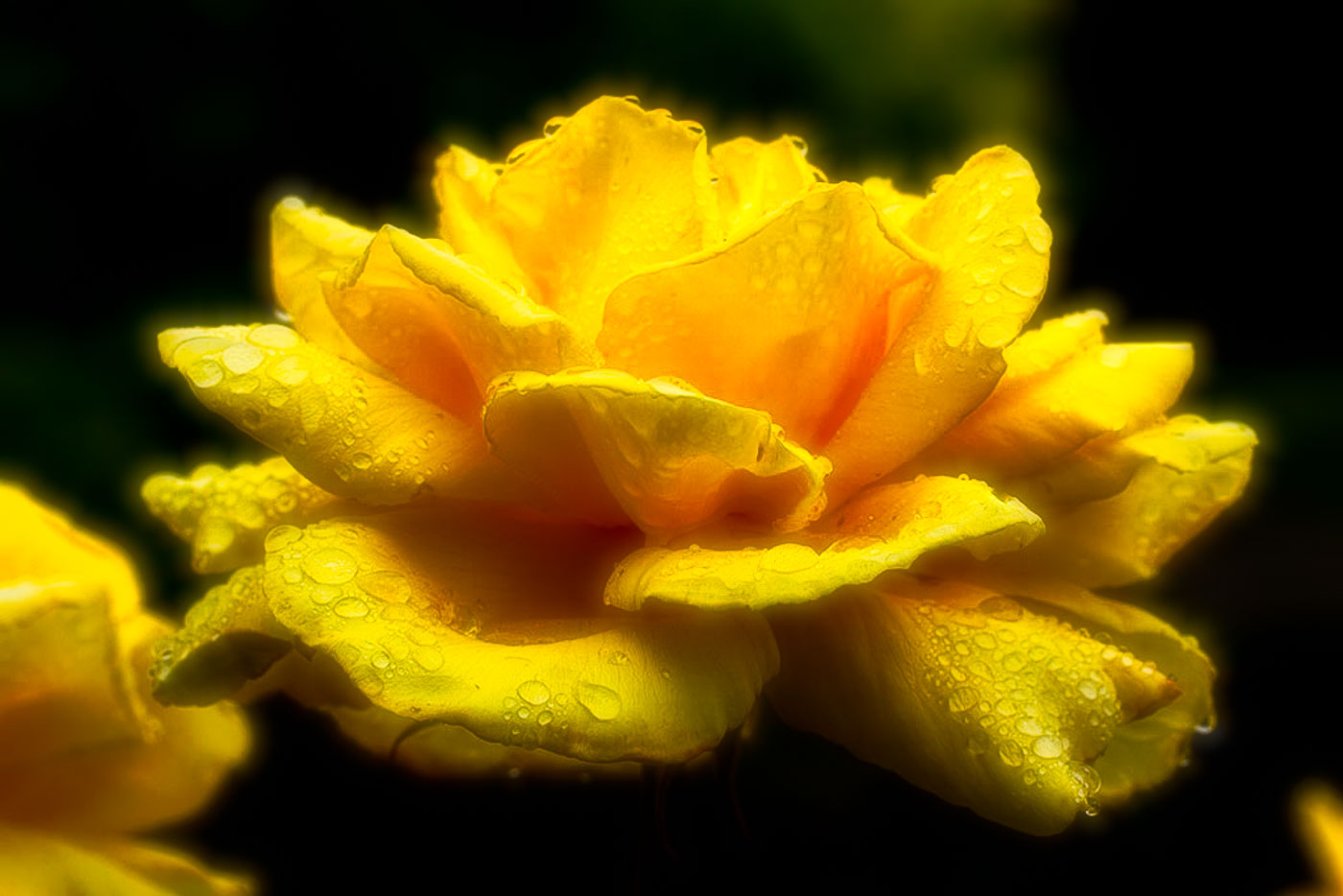
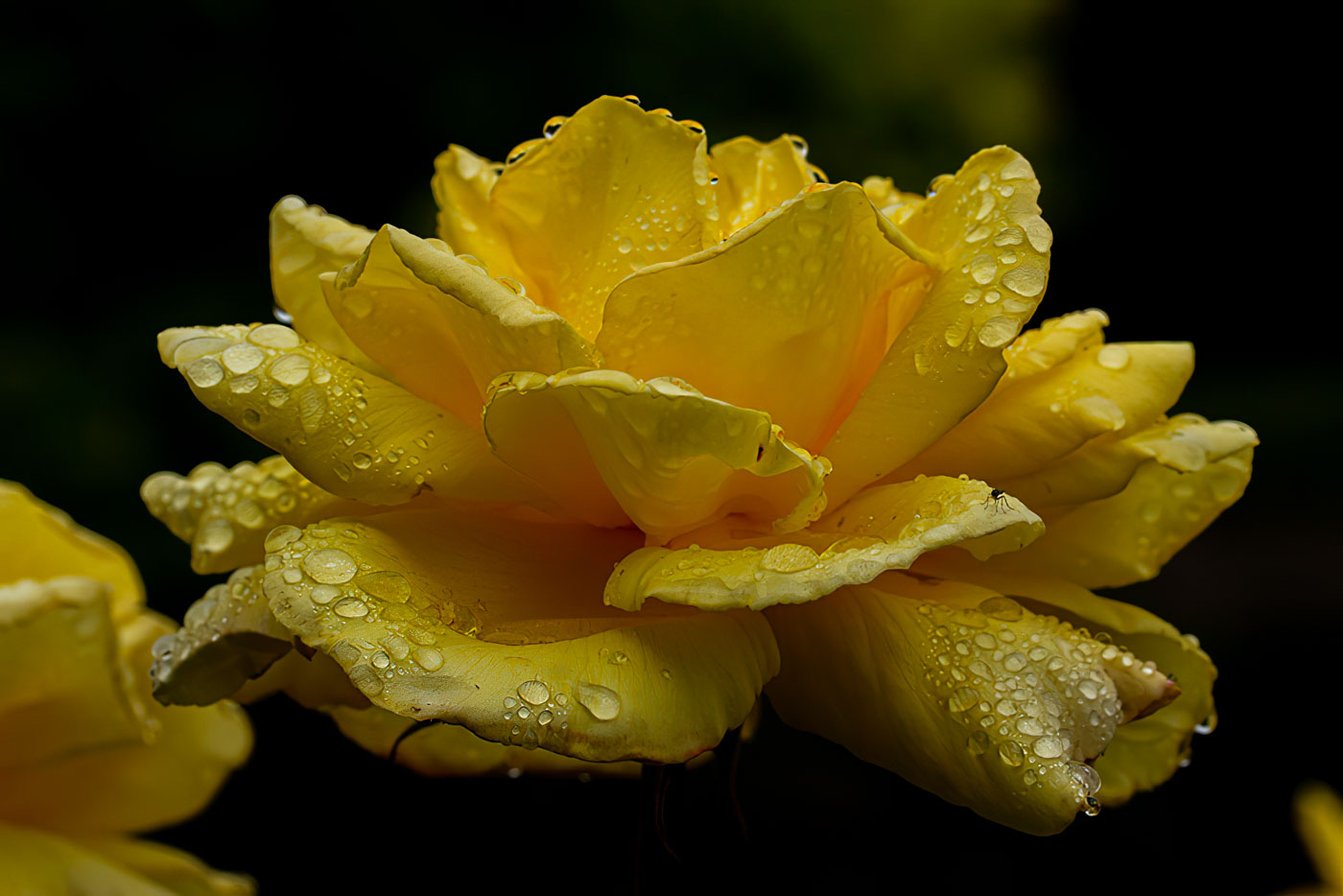
Nadia, I Love the water drops on your Rose, however, I prefer the water drops in the original image. I've had the issue myself where the editing causes some of the water drops to turn white. I've done a quick edit where I used LrC to select subject and then increased the yellow luminance to 70 thereby increasing the yellow color but not the white on the water drops. I still felt that the Rose is slightly beyond peak so I edited in Topaz photo and then used the Celestial look to achieve the 2nd image. That removed the dark edges and added a glow. Hopefully you are not unhappy with me for editing your image. |
Jan 5th |
| 80 |
Jan 23 |
Comment |
Jacob, your Morning Glory is sharp throughout and the lighter center draws my eyes into the image. Great editing to remove distracting elements in the image. Keep up the great work. |
Jan 5th |
| 80 |
Jan 23 |
Comment |
Rich, a very nice edit to the poppy. The transparent poppy resulting from your Layers is beautiful, striking and we thank you for sharing your LAB conversion. You've converted the flower to a fabric wedding lace type of image. Well Done. |
Jan 5th |
| 80 |
Jan 23 |
Reply |
Thanks Rich I appreciate your comments. |
Jan 5th |
10 comments - 4 replies for Group 80
|
25 comments - 11 replies Total
|









































































































































































