|
| Group |
Round |
C/R |
Comment |
Date |
Image |
| 3 |
Aug 22 |
Comment |
You are welcome Michael.
Bob |
Aug 13th |
| 3 |
Aug 22 |
Comment |
Hi Michael. I noted your Creative Flower image as I was scanning the groups. Ever since COVID I have been shooting and making your style of photography. Yes, it isn't easy to get great scores, but I have been rewarded by seeing other members, PSA & CC, following in my (and yours) footsteps and submitting altered/creative images to competitions and critiques. BTW, Only 1 of my 3 camera clubs still does scoring. The others are doing critiques where I get member feedback & suggestions. Even in PSA I see these changes. We aren't traveling so my default subject is flowers and others are following. A flower is a flower and some are prettier than others, but adding Creative edits to flowers can bring the WoW factor from others. When I first saw your image above (in thumbnail size) I didn't have that Wow feeling but, I looked closer in full screen it is WOW WOW Fantastic, especially when seeing details of the background and your flowers. Truly a work of Art & Love. Don't give up. I shoot for a 50% acceptance so I don't get disappointed and I'm achieving that. I see the tide changing as many folks not touring the world for great photos, they are making Creatives from their own portfolio and Topaz Studio2 has helped very much in that regard. Best!! Bob Legg
|
Aug 8th |
2 comments - 0 replies for Group 3
|
| 29 |
Aug 22 |
Reply |
Yes, time when it's too hot, too cold or heavy rain, that's where I find my time. |
Aug 10th |
| 29 |
Aug 22 |
Comment |
Thanks Judy for your compliments. |
Aug 10th |
| 29 |
Aug 22 |
Comment |
Well done Judy. Isn't it wonderful to go back to old images and use updated software that reinforces why you took the image. No suggestions for change.
Bob |
Aug 9th |
| 29 |
Aug 22 |
Comment |
Thank you Gunter. As you have observed I try to get the best photo to take into the creative process and keep the editing "just about right". |
Aug 8th |
| 29 |
Aug 22 |
Comment |
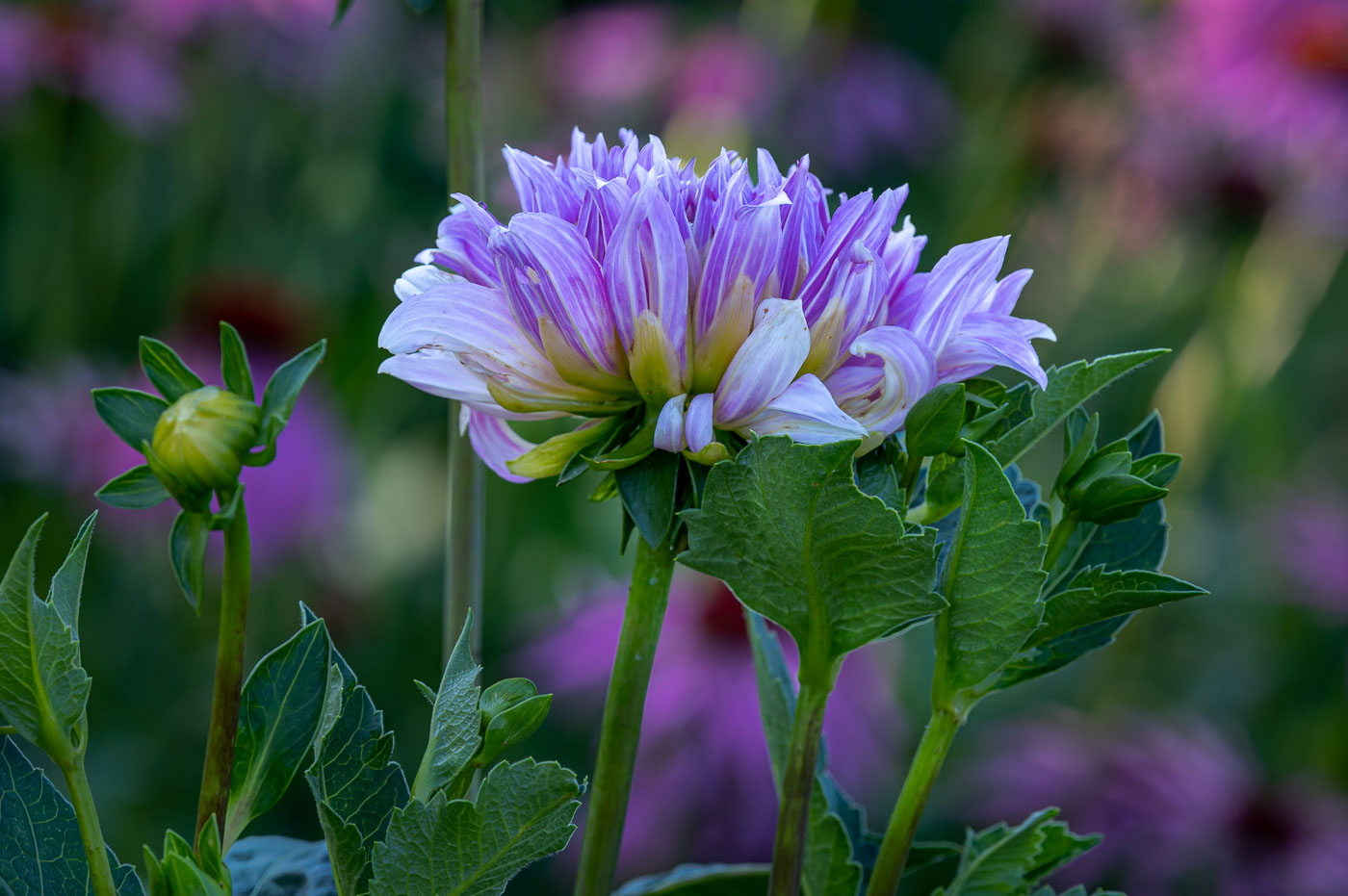
Hi Karen. Thank you for your positive comments. Here is my original image. Probably less changes than you were expecting. The bokeh colors in the background and Topaz filter & looks bring the flower to life as art vs a flower. Hope this is helpful.
Bob |
Aug 8th |
 |
| 29 |
Aug 22 |
Reply |
Thanks Tim |
Aug 7th |
| 29 |
Aug 22 |
Reply |
I understand Ron. Culled out many myself. With the new editing tools many and image can be made usable. Unfortunately we can't get back to these places and duplicate the shots. The brush edits you used did improve the image. Good job. |
Aug 6th |
| 29 |
Aug 22 |
Reply |
Okay, thanks for your reply. So there is a relationship that I'm not comfortable trying to explain between
iso: film speed in the old days
f#: It works in reverse. ie: the lower aperture numbers like f2.8-3.5-4.5 let in more light (hole is wider) and the higher numbers like f18-22-&32 let in less light (because hole is smaller)
Shutter speed measured in seconds or fractions of seconds so slower speeds let in more light and faster speeds (think 1/2000 sec vs 1/30th sec) let in less light.
These all work together to come up with the proper exposure, and yes multiple combinations can give you the proper exposure.
You are obviously a smart women and it takes some time to feel comfortable with photographic exposures. Don't get discouraged. |
Aug 6th |
| 29 |
Aug 22 |
Comment |
A very well done image Gunter. I love the flower details and the colors. Not sure how you got multiple flowers on top of each other to be so translucent, but maybe you accomplished that via software or flower parts? It is well balanced and symmetrical.
Bob |
Aug 6th |
| 29 |
Aug 22 |
Comment |
Nicely composed image Ron. I think slightly overexposed as the shine/glare(reflecting) above the falls and the water below are probably off the right side of the histogram. Do you have other images taken at the same time that might have less exposure? Photoshop and Lightroom have options for reducing the glare.
I've recently had very good success of using Photoshop auto Align and auto Blend when multiples images are selected to average out the exposure. The exposure on the rocks is excellent. The haze upstream is beautiful.
Bob |
Aug 6th |
| 29 |
Aug 22 |
Comment |
An excellent shot Karen. You get amazing wildlife images. This is tack sharp and the eye shine is spectacular as well as the color and tonality. I agree with Ron, that the background could be made a little darker. I don't have a problem with showing the vine that he is eating, it explains why he didn't notice you earlier.
Bob |
Aug 6th |
| 29 |
Aug 22 |
Comment |
Well done Madeline. Caught the peak of the action. Probably a cloudless sky caused the harsh light and the closest side to be in shadow. I'm wondering if your camera is set on auto ISO? Last month you had a very high ISO and this month you have a low ISO. The auto ISO can be tricky to use because the photog needs to think about what the camera exposure is doing. It gets you the photo but not always the way you wished. If you ask Ps or LrC to pick the subject and then reduce the hi lights and open up the shadows by moving the slider to the right you might have a better result.
Please get back to us and maybe we can help you out. Depending on your camera and your subject an ISO of 400-600 might be a good setting.
Bob |
Aug 6th |
| 29 |
Aug 22 |
Reply |
Yes, I think a very good chance of that "star", Good Luck |
Aug 6th |
| 29 |
Aug 22 |
Comment |
Thanks Ron. |
Aug 5th |
| 29 |
Aug 22 |
Comment |
Fantastic image Tim. Sharp Heron and see the face on the fish and nice reflections. Great composition and exposure. Handhold all day long with this light and wildlife. I can't find a single thing to improve.
Bob |
Aug 4th |
10 comments - 5 replies for Group 29
|
| 62 |
Aug 22 |
Reply |
Pete, that's a great rendition. Glad to see that so many have taken the Creative road and had more fun with your own and other group members images. Great work everyone. |
Aug 10th |
| 62 |
Aug 22 |
Comment |
Thanks LuAnn for your always pertinent points. Yes, I see those white on white dots. I fixed many but obviously missed some. I was in a hurry to do something else and didn't check as closely as I should have. They were caused by using the embossing filter and tiny specs of pollen grew.
Yes these are the Star Gazer Asian Lily's that smell oh so well.
I understand your point about flipping horizontal, however, these are Asian Lilies and they follow the Asian written languages which are read and written from right to left. Its True. But of course I didn't think of that at the time of placing the flower or editing.
So that's why you might wonder if I'm fine. Yes. Maybe lacking sleep and cool outside air but otherwise fine. Thanks for asking.
Bob
|
Aug 7th |
| 62 |
Aug 22 |
Reply |
Thanks LuAnn. The original tells the story perfectly. The tree stump is literally caressing and nurturing that mushroom and just waiting for you to come by and share it with everyone. Beautiful image and story.
And you are forgiven for having a senior moment. I think many of us clearly understand how that can happen.
Bob |
Aug 7th |
| 62 |
Aug 22 |
Reply |
Thanks Israel |
Aug 7th |
| 62 |
Aug 22 |
Comment |
Another excellent image you made Israel. Bridge was nice but your model just served as giving the item scale. But you removed her and created a wonderful set of curves that draw the viewers eye all the way thru to the end. It perfectly shows how a creative mind can make a very good & unique image from a good image.
Well done Israel. |
Aug 6th |
| 62 |
Aug 22 |
Comment |
Well Bunny! I'm glad you are seeing more creatively. These fishing net floats had no possible use to a casual photographer, but you made a wonderful abstract image by duplicating the layer and merging. The large white ball with your creative leaves or flakes to cover the ropes was a fantastic idea to remove the true identity. The tilting of the image and upside down balls and sand also adds an interest and uniqueness to the finished image. Many other little features I see as I spend more time studying your image. I feel honored that I have caused your mind to be more creative.
It works!!
Bob |
Aug 6th |
| 62 |
Aug 22 |
Comment |
Emil, A perfect choice for Black&White. The original red is not dynamic, but your B&W version has plenty of tonality to make it jump off the screen. Interesting that you underexposed the image. Was that because of the highlight on the bump? I also like the texture that you have brought out of the color image or did you add that?
Fantastic that you saw this tractir image amongst the other tractors! Well done. |
Aug 6th |
| 62 |
Aug 22 |
Comment |
Hi LuAnn. I Love your mushroom and how it jumps at me from the dark background. Its so beautifully textured and clean. What I don't get is the leaf, bark or ? that is in the foreground. It's very nice but I'm thinking so nice that it wasn't natural? So could you tell us how that came to be? No original image to get a hint.
A wonderful natural image.
Bob
|
Aug 6th |
| 62 |
Aug 22 |
Comment |
Pete, I admire you adding InFlightBirds,IFB, to your list of accomplishments. I've been to Huntley Meadows and it is a fantastic place. I like your composition and am not bothered by the tree trunk reflections. I think you lucked out getting this image. Yes, I know it wasn't all luck. I'm thinking not many bird photogs would walk that boardwalk, and shoot at 500mm, hand held, at 1/125sec and expect to get anything sharp. I know that camera is fast focusing etc and its also great with managing higher ISO's so why would the iso be set at 100? Maybe you knew that 500mm would be short and you would need to crop to only a fraction of the original image? I think I detect head movement on the goose and that could of been reduced or eliminated at 1/250 or 500/sec. while maintaining motion in the wings. I believe that most birders would recommend 1/1500 to 1/2000 to stop the motion. Kudos for showing the benefits of having a newer camera with top quality focusing and ability to not have camera movement with low shutter speeds.
Bob |
Aug 6th |
| 62 |
Aug 22 |
Reply |
Thanks Pete. Yes, I like the curves also and made sure they were in focus. The natural textures on these asian lilies were a major factor to increasing those natural textures.
Bob |
Aug 6th |
| 62 |
Aug 22 |
Reply |
Thank you Emil. Point taken, I didn't share the ones that were closer.
Bob
|
Aug 6th |
6 comments - 5 replies for Group 62
|
| 80 |
Aug 22 |
Comment |
Kathryn, your comment above dated the 19th is exactly the same as you wrote on the 2nd. Note above that I made edits and made them on another image that was taken within a few minutes of the previous. Not sure if PSA server did this or you cut and paste? I'll delete this version once you get this reply.
Bob |
Aug 19th |
| 80 |
Aug 22 |
Comment |
Thanks for your comments Jacob. I understand everyone forms their opinions based on what they personally like. I agree with that. I'm tough-skinned and appreciate all comments and don't expect to have 100% acceptance (closer to 50% actually). The colors behind this image are very natural. Taken in the rain with 500mm so everything in back is soft and the garden flowers are just showing off their rainy day colors. |
Aug 15th |
| 80 |
Aug 22 |
Comment |
Doug these are a fantastic group of images. Being all the same plant type with similar features, colors, lines and s they fit together perfectly.
Bob |
Aug 14th |
| 80 |
Aug 22 |
Reply |
Just so you know. We know you are human. |
Aug 14th |
| 80 |
Aug 22 |
Reply |
Doug, I tried editing the entry that has the newer photo. I entered Hosta #3??? Is that the 3rd image you posted>
Sometimes the server is Quite slow |
Aug 14th |
| 80 |
Aug 22 |
Comment |
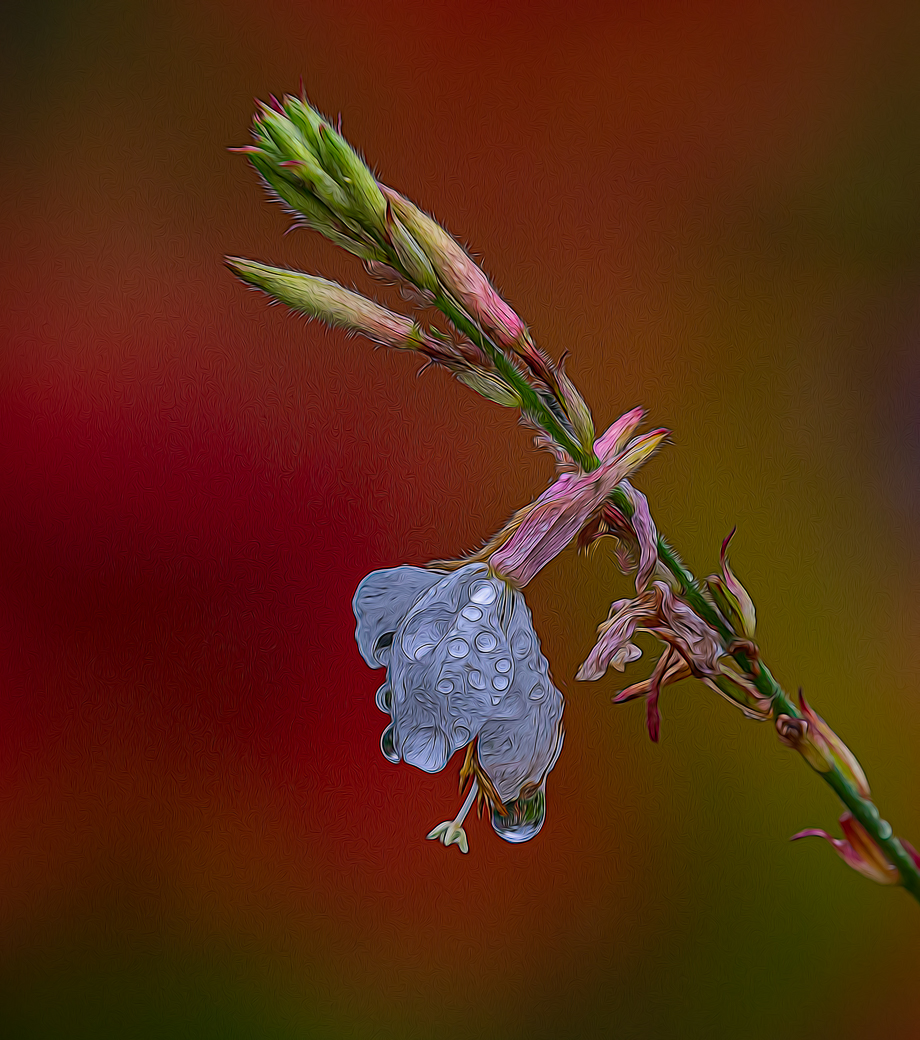
Everyone, I have taken many suggestions and gone back into LrC and used another original and fixed things pointed out by the group and used a different Topaz Look called Fur& Feathers and not as impressionistic as I like but it brings out textures in the flower and hi lights water drops (thanks Doug),Kathryn for the cut off,LuAnn for not liking the purple. I encourage any member to resubmit any image with improvements so the group can see how the changes helped. Your thoughts? |
Aug 12th |
 |
| 80 |
Aug 22 |
Comment |
Thanks Doug for your observations that had escaped me. ie: blank triangle and making an opening to the left of the dead flower. While that's what the original image had maybe it would help. I'll see if I can incorporate some of these suggestions. But Doug,maybe not in our photo DD, the first impression is the many times the only 1. |
Aug 12th |
| 80 |
Aug 22 |
Comment |
Nadia, I only started using Lightroom and Photoshop 2.5 years ago. Many YouTube videos on Lightroom. It uses the same editing engine as ACR but offers powerful image management over other methods. I also used videos and webinars from mattk.com |
Aug 11th |
| 80 |
Aug 22 |
Reply |
Thanks for stopping by LuAnn. I don't worry about a sinister diagonal if it's the way I took the image and flipping doesn't improve. The purple in the upper right is the natural color of my butterfly bush in the rain. So I'll leave it thank you. Yes, the pink blossom is natural as many white blooms had wilted pinks and I do like the waba sabi approach. Sorry, I don't see any subjective stories being told by the image and its not talking. |
Aug 11th |
| 80 |
Aug 22 |
Comment |
Excellent, as that is what I have been doing for the last two years, but I use other edits also so you won't be bored. |
Aug 10th |
| 80 |
Aug 22 |
Reply |
Nadia, BTW, you don't have to convert to 72dpi. Just keep the image under 1000k and the server will handle the rest. As referenced in Guidelines for DD. Lightroom export has a checkbox for max size and that's where you enter the 1000k. |
Aug 10th |
| 80 |
Aug 22 |
Reply |
Peter, I'm not sure of your definition of "weak"? You don't do Impressionism and therefore weak?
I think you have read too much into my image and should take it as an image of a flower.
Thank you for your complements.
Bob |
Aug 10th |
| 80 |
Aug 22 |
Reply |
Peter, does your editing add artifacts to other peoples images? Like some hairs from the stem have grown to the right of the stem? |
Aug 10th |
| 80 |
Aug 22 |
Comment |
Thanks Doug. I appreciate the info and while this prior winner is a very beautiful image, I like this new,#27, even better. Go for it.
Bob |
Aug 10th |
| 80 |
Aug 22 |
Reply |
Peter, we are all new to each other in this group. Knowing that you occasionally place certain items "on purpose" I will evaluate it as it was intended and not an oversight on your part. I understand that there are more than 6 ways of treating an image, but for the purposes of this group of 7 and submitting 1 image we aren't likely to see more than 6 ways.
I do not think that your image lacked depth and I had noted that. If you had added similar blobs above the other pedals it would clearly show as being intentional and perhaps would have helped with your flatness issue that I do not believe exists with this image.
|
Aug 10th |
| 80 |
Aug 22 |
Comment |
Doug, thank you for this fantastic image. Because of your patience (with a stack of 51 images) we are able to see the true depth of the hosta leaf and the possibilities when using focus stacks. Like Nadia, I wonder how the leaf formed this way, by nature? or your drying method? We have no growing potential for hosta. We already have more deer than we can deal with and adding these "dessert" leaves would be crazy. Doug, did you photograph on black background, photograph on a lightpad and use selective color to change white to black, or ? I wasn't familiar with Lenswork but now see it as a magazine for creative photographers. Is this your first attempt to get into that mag? I think this image has a very good chance of making it. |
Aug 10th |
| 80 |
Aug 22 |
Comment |
Peter, A very good job with pulling out and separating the flower from inside the main plant. Great color, fantastic depth of field and composition. I agree with Nadia that you have errant part of the top petal that needs to be eliminated. Your editing shows how an image can be made and edited in multiple ways. Like using Lightroom vs ACR (told they are the same), I would of used Ps content aware to remove plant parts, cropped to square and then Topaz DeNoise reduction and Gigapixel to make larger. Absolutely nothing wrong with your editing path Peter, I'm just indicating to the group that there are maybe 6 ways to come to the same or similar result and we each do our own path. Peter, A beautiful image and thanks for sharing. |
Aug 10th |
| 80 |
Aug 22 |
Comment |
Thanks Nadia. My goal is to also get more creative ideas and editing tips from the group and your comments about this image and to Jacob both point to Photoshop edits that I don't well or at all. |
Aug 10th |
| 80 |
Aug 22 |
Comment |
Syed, I just Love the colors in this image. It is well composed, however, the early morning light caused a depth of field & focus issue. What you would want to try is to push up the iso to maybe 640 and thereby increase you f stop to f/8 and even up to f/11 if possible. You did a great job holding the camera steady as witnessed by the center but the small pieces are only somewhat sharp in front. If you are able to get a straight shot down you can get away with a smaller F/stop like 6.3 or 7.1
Keep this in mind an sharp image with noise is better than a blurry image with no noise. The current day software will do a much better job processing for Noise and sharpness. Hopefully you know where to find beautiful flowers like this again.
Bob |
Aug 9th |
| 80 |
Aug 22 |
Comment |
Hi Nadia. I'm happy that you are In our group. I've never seen Picasso flower before. I like the colored fringe rim of the metals and the green center. It is well exposed and the 2 blossoms in the background are just perfect filling the frame but clearly in the background. I think you did that with this image. Is this the type of background you use often? |
Aug 9th |
| 80 |
Aug 22 |
Comment |
Jacob, your yellow flower is sharp and detailed throughout. I like the lighting and translucent petals it creates and your creative positioning of the flower with the blue sky background. I wonder if you considered enhancing the flower by removing the 2 or 3 damaged spots on the petals, probably caused by insects? I also wonder if the center of the flower would look brighter if you increased exposure in the shadows? Thank you for your submission.
Bob |
Aug 7th |
| 80 |
Aug 22 |
Comment |
Thank you Mohan. I see your point and only have a minor problem with the flip if I lose some folks with the stem coming out of the corner and that's why I softened up the stem in the right corner. I appreciate you stopping by and commenting.
Bob |
Aug 5th |
| 80 |
Aug 22 |
Comment |
Kathryn, unless you moved flowers and parts around, this was not the original. Don't go crazy looking for it, easy to do in LrC for next round. |
Aug 4th |
| 80 |
Aug 22 |
Reply |
Thanks Lance for stopping by. I have to admit that I am not versed in Japanese culture & art, but appreciate your comments and observations. So now I have a 3 for 1 thanks to your correlating the two images of the flower. I have no problem with your assessment about the original image. I'm just at a point in my own work where a regular flower image is lacking, without my own creative touch, and we all know that not all images achieve the goal of being better than the original. BUT!!, I'll happily accept your 2 for 1 award.
Bob |
Aug 4th |
| 80 |
Aug 22 |
Reply |
Thanks Kathryn for your positive comments. I tried the diagonal the opposite direction and it brought my eye beyond the flower and into the background. You are absolutely correct about the top buds going out of the frame. This flower was moving around wildly and while concentrating on the flower and water drop I missed getting everything into the frame. However, I have several more images that have all within the frame but the water drop and background is not as colorful. Sometimes a trade off is necessary. I've been using Ps Auto Align and Blend lately as I'll see if I can get the best of both worlds in 1 image.
Thanks
Bob |
Aug 4th |
| 80 |
Aug 22 |
Comment |
Kathryn, you image is both interesting and beautiful. I like how you broke the odd number rule with your 2/4 composition. Your editing on Bottom Left blossom and darkening the top row really dsworks, bring my eye to that flower. I especially like the s moving my eyes into the image.
A minor nit, perhaps on future submissions you wouldn't mind sending along a .jpg of the original image so we can see the differences your editing made.
Thank you for a wonderful submission.
Bob |
Aug 4th |
17 comments - 9 replies for Group 80
|
35 comments - 19 replies Total
|









































































































































































