|
| Group |
Round |
C/R |
Comment |
Date |
Image |
| 29 |
Dec 21 |
Comment |
Thanks for your Fantastic review Tim. It's not always easy to be happy with a 50% approval, but heck every image and edit lives in a world of approval and disapproval. I hadn't thought about it for a rock band perhaps because I'm of the age that skipped over being a rock band lover, But then again "rock" is as variable as photography this day. So by using my own vote you put me at the 50%. |
Dec 16th |
| 29 |
Dec 21 |
Reply |
Thanks Judy and Gunter for your edits and comments. I understand that by my going into more of the Altered Reality/Creative/Abstract editing that I am turning off 50% of the audience, but Altered Reality/Creative/Abstract direction Is where my interests are heading. I've not had much feedback experience using my techniques on cars and still need to refine my edits to gain a little more approval. I have NO issues with anybody making edits as they see them. I prefer Gunter's version because it retains sharpness of the leaves and pine needles and car parts.
Judy, I'm not favoring your version because it loses detail that I worked to maintain. I use masks often in that regard. I too use the Impressionistic filter but have not used it on something like a car. I called the "Expressionism", filter, not accurately, its a "Look" and it uses the smudge filter and you should find it under the Looks tab if you wish to try it. I customized the "look" to my likes, but I should of pulled back on the amount slider to lessen the effect and I appreciate your feedback. |
Dec 16th |
| 29 |
Dec 21 |
Reply |
Gunter, I gave it a try using your suggestions. Maybe just my inexperience, but the expressionism filter is in Topaz and I was unable to only get that only the green and brown ferns. I tried to make the leaves on the hood pop but I'm not pleased with it and the dappled light doesn't help. Yes, the expressionism filter does cover for my inability to fix the flaws. Thanks for your suggestions. |
Dec 14th |
| 29 |
Dec 21 |
Comment |
Very nice Abstract Judy. I've been doing many Abstracts myself during the last 6 months. This looks like the results that come from doing a "Mirror Image" in Ps and combing with Light Blending modes, however, I'm not remotely proficient in Ps. I have been satisfied with using the Topaz programs. I'll to go back to my D300 images and see how they work on images with sharpening and noise issues. I don't have a problem with the shadow on the left. I think you did a fantastic job in finding an image that works well. As you know, that's a majority of the battle to take or find an image that works and I think you Double Stairway Bug is very very nice. |
Dec 10th |
| 29 |
Dec 21 |
Comment |
Yes Gunter, a thought provoking image. Beautiful foreground rocks and water flowing over them. Exposure on the foreground is just right. I don't understand about the off-white in the center of the image? Is that fog or reflections from sun or did you do something to attain your thought provoking thing? Did you think of cropping all of the center of the lake and far shore and just going with the rocks and shoreline? That is your image right there. |
Dec 9th |
| 29 |
Dec 21 |
Comment |
Well seen Tim to catch the "first" boat leaving and caught it without a merge behind the boat. I too light shooting at daybreak. Looks like the wind was already blowing. The wall and light pole divide the image but realize you probably didn't have any other options. I think I would of pushed up the iso further but the D850 can handle it. Assume you show in Raw, you might try to bring out the magentas and orange tones in the sky. I think you have a great image if you get a chance to tweak some of the tones and settings. |
Dec 9th |
4 comments - 2 replies for Group 29
|
| 62 |
Dec 21 |
Comment |
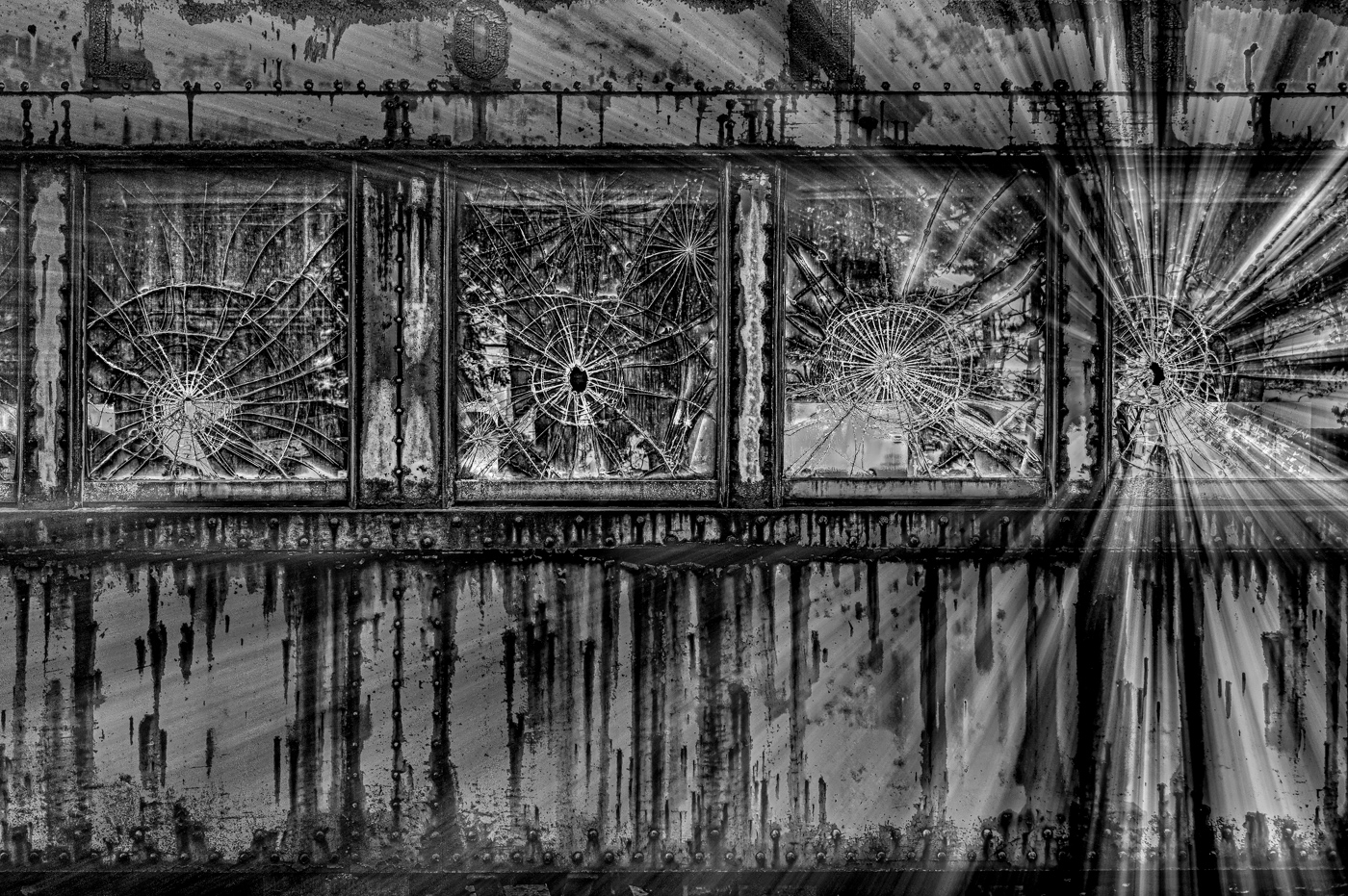
Thanks Pete. I was intent on not losing the "L" and neglected to crop off the portion of that window on the left. Yes, going back to Topaz opened up the techniques like Zoom and masking that I couldn't do in Ps editing. I'm not asking for you to do these types of edits in Ps, but do you believe a mask can be placed wherever desired in Ps? I'm thinking the other edits can be accomplished. Say you? |
Dec 19th |
| 62 |
Dec 21 |
Comment |
Well, here you go. Based on some suggestions from everyone, and my own creativity, I've made this latest without using Ps. Topaz Studio for everything. Yes, it probably can be done in Ps, but half of you have many years x20 of using Ps and I haven't, and making masks in Topaz is like making masks in 2022 LrC. So I used motion zoom to bring your eye to window #4 from left and radial mask to remove zoom from all windows. Used Precise contrast and Precise detail. Used brush mask on "Long". Tried blending modes but that removed my zoom. Also used Opacity at 85%. Used Texture at 100% in LrC. Do I have a Thumb's up from 50% of you. I know Pete you favored the very dark version but I think you'll like my Zoom and windows. |
Dec 17th |
 |
| 62 |
Dec 21 |
Comment |
Pete, thanks for the try but I've fallen out of favor with #3 as presented. Too Dark and therefore I've gone back to the drawing board. |
Dec 17th |
| 62 |
Dec 21 |
Reply |
Thanks for your ideas and thoughts LuAnn. I agree that my original 3 is too dark and I did that edit too quickly not thinking anyone would see value in a mirrored image with backward letters, glass over metal and totally unbelievable. But this group did see some value and I'm in the process of coming up a version that everyone will Love. Well, not everyone for an Altered Reality, but I'll settle for 50%. |
Dec 17th |
| 62 |
Dec 21 |
Reply |
Shucks, You aren't making sense LuAnn. Suggesting a replacement sky? I didn't want you to make a storm!!
Merry Christmas |
Dec 14th |
| 62 |
Dec 21 |
Comment |
Exactly. Excellent. I couldn't have done a bit better and you sharpened your skills to make these changes. The edit gives you the correctly oriented and complete sign, with enhancements, the 3 rows of dark bricks on the building and minimal blank sky. Wonderful job Leah. |
Dec 12th |
| 62 |
Dec 21 |
Reply |
I like your life shafts and darken of the window tops. I know the 3 windows vs my 4 looks better in terms of composition, my PJ brain doesn't give me enough hint as to what the letters spell and by adding the G many in the Northeast coast would guess the Long Island RR as I did. |
Dec 9th |
| 62 |
Dec 21 |
Reply |
I like what you have done with the image Emil. |
Dec 9th |
| 62 |
Dec 21 |
Comment |
I think I would suggest a mix of the above suggestions. Rotate the sign so that the right side is vertical, like your original and crop along the bottom like Bunny's version and not included the windows but kept the side of the building like Leah's. The subject is the entire sign in my view. I also like the distortion or enhancing of the sign like Leah has at the top. Yes a sky with detail works for me. Not sure the old Pentax would be up to the pixels or not. I have been using Topaz Gigapixel and it does a great job of making a great upsized image. |
Dec 9th |
| 62 |
Dec 21 |
Comment |
Pete, I've been doing the same thing and going back to my first digital images and either fixing up or trashing them. 2001-2006 weren't even in Raw. This image stands the test of time. Great texture, detail and ideal image for B&W. Only suggestion I might offer would be to drop up from the bottom to you get to the bottom of the large tree on the left. Unless you thought was to enhance the overgrown effect. Yeah, the color version doesn't do anything for me. |
Dec 9th |
| 62 |
Dec 21 |
Comment |
Well, look at all these comments while I watched Monday night football. Yes, Pete is 100% correct about the new masking and editing tools in LrC & ACR. They make editing so much faster, easier and better results. As someone who doesn't use Ps,except some creative, these new nask tools have become essential in just the few weeks they have been out. My percentages are slightly different than Pete's, with 70% brush, 15% linear (for skies and foregrounds) and 15% radial.
I really like the cranes front and center becoming the focal point. Thanks Pete for showing us how it's done. |
Dec 7th |
| 62 |
Dec 21 |
Comment |
Yes, I did run those image alignment/parallel tools, however I might of done it wrong or my original was off so much that it couldn't fix 100%. I probably should of backed up more but obstacles were present and I previously had been told that this area was closed to the public. BTW, some cars definitely had sags in them as they have gone past their scheduled lifetime. The original showing had been corrected for parallels etc and prior to that I did have small roofline area and slanted white sky which led to the very little space over the letters. Yes, the windows were the drawing point to my eyes, along with the rust. Thanks for your comments
|
Dec 5th |
| 62 |
Dec 21 |
Comment |
Thanks for the info Bunny. The rivers in the Northeastern US don't have many locks and the St Lawrence certainly does but of a much larger scale, so these were even smaller by Mississippi standards. Nothing wrong with small cruises, that's what we have been on as they lead to a stronger bond with crew and other passengers. |
Dec 5th |
| 62 |
Dec 21 |
Comment |
Israel, you made some great choices in photographing these birds. You obviously didn't have any extra light and the birds beyond the bottom third weren't going to be sharp no matter what. The slow 1/100 shutter speed was fantastic for capturing some of the birds coming or going. The fog also works for your image. I'm never very into the monochrome tint on my own images but this really works for your image as well as the extra fog you added to the front corners. Reflections are great also. I sorta wish there were a group of the birds that drew my attention and that stood out from the others. Very nice image |
Dec 4th |
| 62 |
Dec 21 |
Comment |
Great Composition Bunny. The concrete walls and the bow flag on your boat all lead to the lock gate. Toning is good. I do wish there was something in the frame to give it scale. I've no experience on these Western rivers, but this looks tiny compared to the locks we went thru in Netherlands and Belgium. This gate also has a height limitation therefore no masts of any size on the boat. Maybe not for the smaller cruise lines that go up the Columbia. |
Dec 4th |
| 62 |
Dec 21 |
Comment |
Very Nice Emil. I'd be one of those going to Old Car City or a similar place. I like that the window is down and that gives clarity to the interior. The leaves inside also add to the environment. The light interior colors really add to the texture inside. The only nit that I might try to fix would be the light on the dashboard on the passenger side. Just a touch too bright. Great job, I look forward to seeing other images. |
Dec 4th |
| 62 |
Dec 21 |
Comment |
LuAnn this is very nice image. I believe these two birds are having an argument over who gets the prized pear or whatever it might be. If the middle pear was smaller, the parent pears could be discussing the youngster. The stems look like bird bills and are arranged perfectly. I have no concerns with the lighting and think the shadows are just fine. I might suggest that you make the spot disappear on the table virtually at the edge of the photo and the middle pear. You have really mastered your lights.
I put keywords in LrC to remind me what I did. |
Dec 4th |
13 comments - 4 replies for Group 62
|
17 comments - 6 replies Total
|









































































































































































