|
| Group |
Round |
C/R |
Comment |
Date |
Image |
| 15 |
Jul 20 |
Reply |
That's the way I understood the PSA rules from many years ago. All and any part of an image must be shot by the photographer. Joan, Luminar is an editing program like Lightroom but Luminar supports making "layers" and making it easier to edit your own photos. I only use my own skies or images found in skies like suns, moons, clouds, fireworks, comets, stars, rainbows, planets, and probably a few more. Also can be used to add texture or make multiple images into 1.
NOW for clarification is this being written on the so called "Bulletin board" or is it smoother place? Sorry, I don't get why its called bulletin board. |
Jul 26th |
| 15 |
Jul 20 |
Reply |
Not a problem Joan. Elsewhere in this months DD I've seen duplicate comments and I think someone stated another lost post. Sorry I don't remember where. But, I bet someone at PSA had an update and things didn't go exactly as planned. |
Jul 20th |
| 15 |
Jul 20 |
Comment |
Great job Kirsti with the latest improvements, however, I prefer the rock to be in the dark portion of the image and light on the front of the creature.
|
Jul 15th |
| 15 |
Jul 20 |
Comment |
Rick, I see you are making use of those great Luminar features. I agree maybe too much trees in the left but think they may be a problem to erase so I agree with Kirsti's idea on moving the moon a little to the right so that it intersects at junction of rule of thirds. Love the birds, their size and placement are excellent. |
Jul 15th |
| 15 |
Jul 20 |
Reply |
Dave, your last sky is very good. Agree with the light area behind the steering wheel/seat. The problem area in the green leaves on the left can be difficult. No simple formula, but it can be solved by moving the sky local/sky Global sliders as well as the Close Gaps or last resort moving the horizon up or down with a change to the Horizon blending. Another hint is to actually erase or clone out those clouds from the original photo. Luminar has improvements coming, maybe as early as this week. Keep up the great work David. Look forward to see your future submissions. |
Jul 15th |
| 15 |
Jul 20 |
Reply |
Joan, I did not delete the post before reading your post. Glad you saw it anyway. The metadata tells me that your D750 (I had one) could of gone up to iso800 and that would of given you more stops to increase your DOF. Perhaps you still have the Raw file. If you have a unique file number you can search and be surprised like me when I have found originals, that had been misplaced when I used another editor to achieve some results like when you did your original cloning. I've never see Almond blossoms (probably none in the Northeast) but they are beautiful and your image is very nice, indeed. |
Jul 15th |
| 15 |
Jul 20 |
Reply |
Glad you liked. I'm an impact photo guy and I think the dark makes that happen. I did use the relight scene slider, but it did not do the job quite as well as I had hoped, so I used the Dodge and Burn tool and painted in the dark lower part of my sky image. I had never used that feature before. So your image contributed to my learning. Hope you had a great day. |
Jul 12th |
| 15 |
Jul 20 |
Comment |
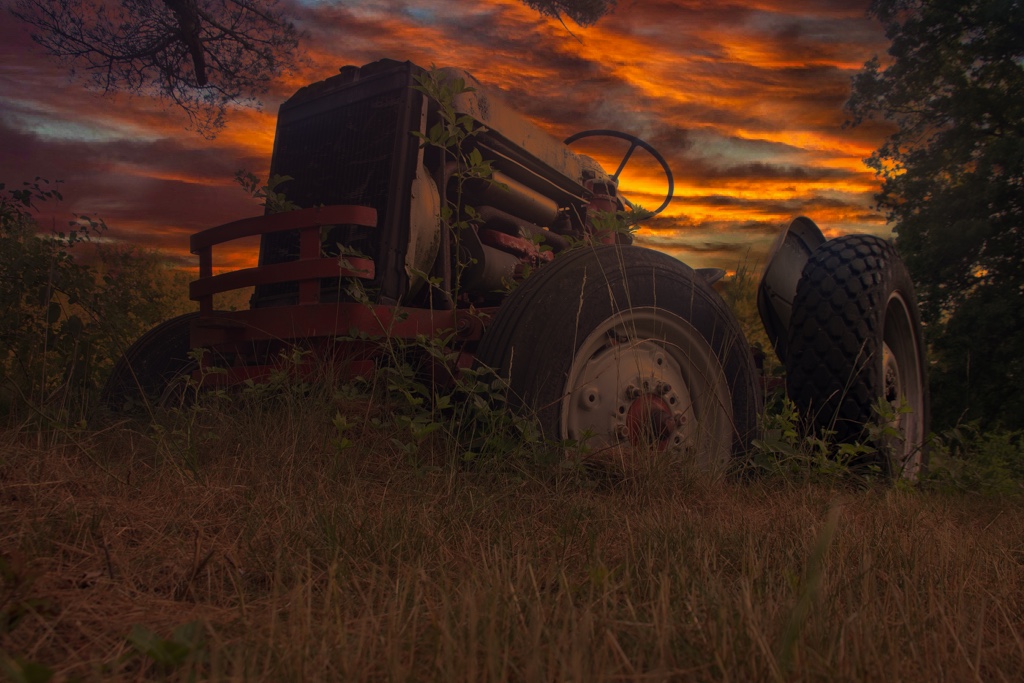
Dave and Kirsti, the secret to good sky replacement is to shoot new images and convert to jpeg without any land at the bottom or go thru some older images and just crop out the sky port and page as jpeg. I've been shooting cloudscapes/skies for many years with not specific use for them. Now I use them in Luminar. Dave this is what I had in mind for the end of day/life of the tractor image. I could of spent more time on some of the details, but heck its your image and I'm sure you want to use your skies. Just trying to feed the creativity that we will all profit from. |
Jul 11th |
 |
| 15 |
Jul 20 |
Comment |
Welcome Dave. Joan, might of had this Bob on her mind when replying to you. :-)
I am an avid Luminar user (Mac version) and have replaced skies multiple times.
The sky in your original composition was just begging to be replaced. It added nothing. The PS version isn't bad, but the Luminar was much easier and faster to replace. I Love your low angle approach to the tractor. Your Luminar sky looks realistic and properly lite to me and using the relighting slider to darken the front of the scene also works well. Since I have more sunrise/set skies in my sky subjects folder, I might of used one of those and then the Warm Contrasted Looks to reinforce the end of the day/left for dead theme. But that's just me and you have done a great job presenting this image. |
Jul 11th |
| 15 |
Jul 20 |
Comment |
Thanks everyone. The line on the left is a pulley as they were doing maintenance on the roof of the lighthouse and that required a ladder etc that wouldn't go up the circular stairs. The pulley line also brought your eye up to the top. Looks like I missed the fix on the leaning lighthouse. |
Jul 11th |
| 15 |
Jul 20 |
Comment |
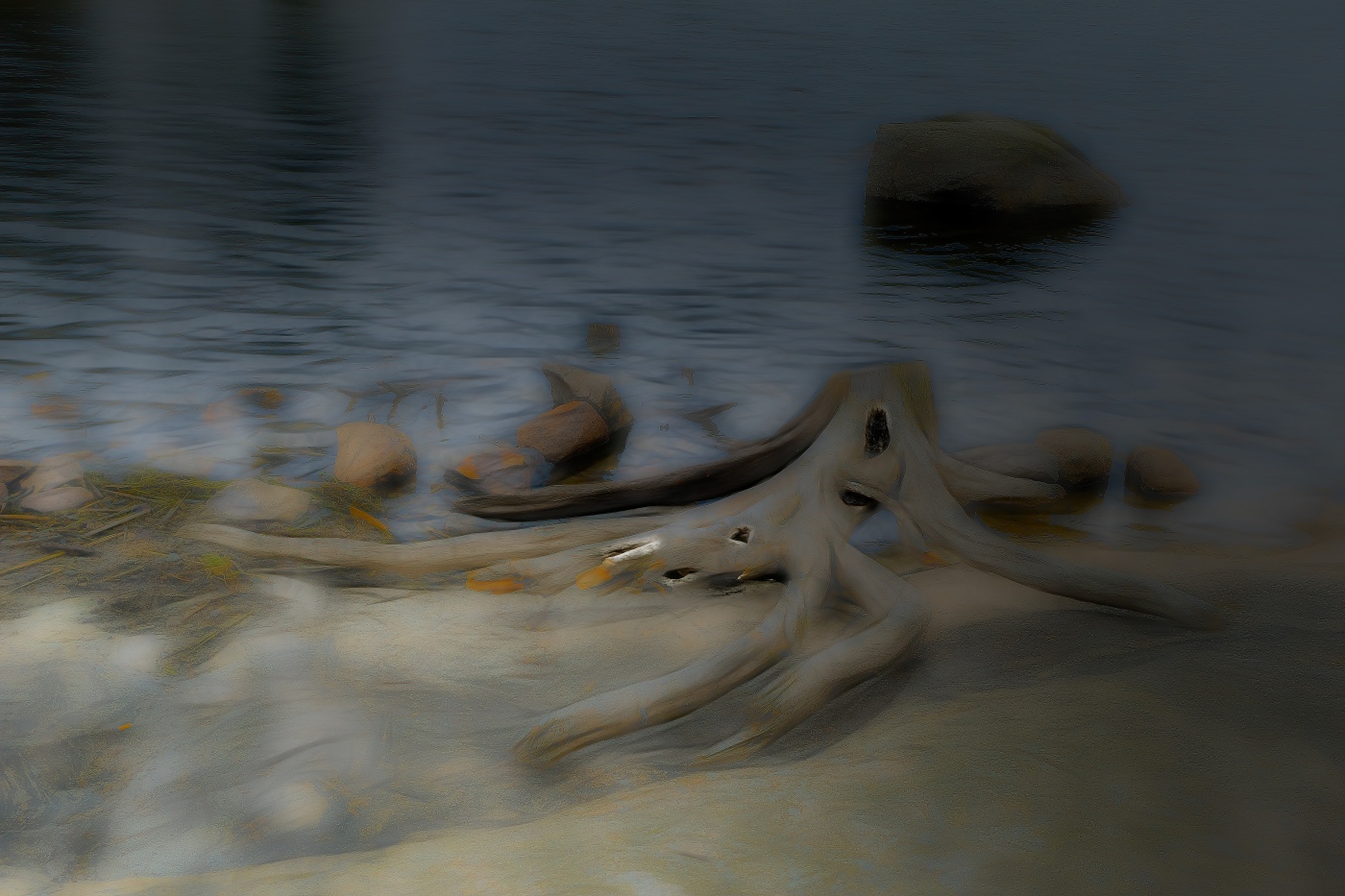
Original received and I used Topaz Studio2 GlowFilter++ to make Kirsti's Creature. Kirsti did give me permission to make these changes and post it for our DD group. |
Jul 10th |
 |
| 15 |
Jul 20 |
Comment |
The vignette is a great idea, but I would try to darken the top right and leave the bottom left lighter. Your eye goes to the brightest area and there is nothing in that top right corner to see so try the reverse so your eye is drawn to the creature. BTW, the most current image is 1024x682. I'm unsure about packaging, but my understanding is that only reduces size for transmission but that it should go back to the size you exported it as. |
Jul 9th |
| 15 |
Jul 20 |
Comment |
Kirsti, definitely think the big rock needs to be cropped like you just did. The fog makes the image better. If you compare your original size image compared to my lighthouse you'll see that mine is larger. Current PSA DD guidelines call for 1050x768 and they are in process of changing to 1400x1050. Your image is 640x426 so you can make your images much larger. I'm unable to utilize Topaz to my liking on your .jpeg image as I was attempting to make parts of the creature smooth and some rough and I was not able to see the difference on the small image. Because of my eyesight and brain I utilize a 27" monitor. |
Jul 9th |
| 15 |
Jul 20 |
Comment |
Kirsti. Sorry, I am not able to edit your image. It downloads with title: showfull.php.html
You should of been instructed to submit the images in .jpeg format. The php.html format is a web format that I'm unfamiliar with and I really do not want to use it on my Mac. If you can send as .jpeg to my email, I will work on it. email: is boblegg@mac.com |
Jul 8th |
| 15 |
Jul 20 |
Comment |
Kirsti, yes, playing with Topaz is fun. I see the creature. I don't see where the large rock adds to the image and think it detracts from the creature theme. I often start Topaz with the Glow filter and its many adjustments, so that was a good choice. I've not used the Chalk texture filter, but I believe that works for this image. I'll try to help make your creature later.
|
Jul 7th |
| 15 |
Jul 20 |
Comment |
Jeri, yellow flowers impact and is nicely cropped or composed. I agree that something needs to be done with the background. Sorry, not the foggiest idea how to accomplish the muting, blurring etc of the background on a cell phone. YouTube probably knows. |
Jul 7th |
11 comments - 5 replies for Group 15
|
| 29 |
Jul 20 |
Comment |
This is a very nice image. The subtle colors and light without harsh shadows really works for this image. Reflections are very helpful also. Another day, other weather or lighting and you probably would find it difficult to duplicate these conditions. Yes the structure on the far right is too close to the edge, but you said you were cruising via boat and by the time you brought the camera to your eye and shot, the whole structure was barely in your viewfinder. As a general rule on something like this and the photographer is moving, I shoot at the wide angle end of the zoom first and then zoom closer. You might find it helpful to check your Image data and it should tell you what the exact mm was on the 70-200 lens. Other information such as your ISO, and shutter speed might also be helpful to you so you can use for next opportunity. You just need to be prepared for the unexpected and zoom earlier and shoot extras. Film is cheap vs your expenses to get there. Great image. |
Jul 31st |
| 29 |
Jul 20 |
Reply |
Stephan, how could you eliminate my fall colors? Maybe you've never seen good New England fall colors? No problem with eliminating trees at the bottom of the falls, but not at the expense of the colors. Might just as well make it a mono. That's like me taking your turquoise water color and making it gray. :-). Thanks for your input anyway and hopefully you haven't taken me too seriously. |
Jul 28th |
| 29 |
Jul 20 |
Comment |
Thanks Judy. I already had changed cropping and saturation on my master, but hadn't reversed because of the line of the falls takes you out of the image. I'll have to look to see if I had another that would work on. |
Jul 15th |
| 29 |
Jul 20 |
Comment |
Karen, yes the moon is a little better, but still Not looking like I'm used to seeing. Unless part of the moon was not lite and you pushed it to make it a full moon. Maybe Bill is correct that the meter was confused with the two types of lighting. |
Jul 15th |
| 29 |
Jul 20 |
Comment |
Judy, You did a great job of capturing this "street" scene. Intensity on the potter's face, no posed, great timing to get hands outside of bucket and pottery piece. Colors great and composition is fantastic. For a followup shot after this one, yes, get lower, but not at the risk of the potter looking up at you and ruining the non-pose image. |
Jul 15th |
| 29 |
Jul 20 |
Comment |
Another great image Stephan. Just has so much impact with the different blues, clear view of the bottom, half in and half out and a unique land/seascape above. Can't think of any improvements to add.
No one is really sure about COVID in August in the states or for the world? Imagine still not as busy as you would like. |
Jul 15th |
| 29 |
Jul 20 |
Reply |
Thanks Bill |
Jul 10th |
| 29 |
Jul 20 |
Reply |
Thanks Karen for your crop idea. That works for me. Guess I was just trying to include as much color as possible but it definitely looks better as you did it. |
Jul 8th |
| 29 |
Jul 20 |
Comment |
Bill, what beautiful colors of yarn/rope/knitted tree wrap to work with. You have created a work of art. I don't find a focal point, but that happens with me also when I'm taking and image and trying to make I'm not a PS user, but I would of used my Topaz studio and had hundreds of art making tools/filters and looks to utilize in making my image. |
Jul 7th |
| 29 |
Jul 20 |
Comment |
Karen, you did very well to predict where both the moon and fireworks would be. The firework is great with just the right exposure time on your camera and sharp. The moon, while perfectly placed, just seems to be lacking the color, especially on the top and right edges. If you exposed the moon for the .8 sec those sections might of been overexposed. What I think I would try is to process both images and put the layers together. Have you tried that? |
Jul 7th |
7 comments - 3 replies for Group 29
|
| 62 |
Jul 20 |
Reply |
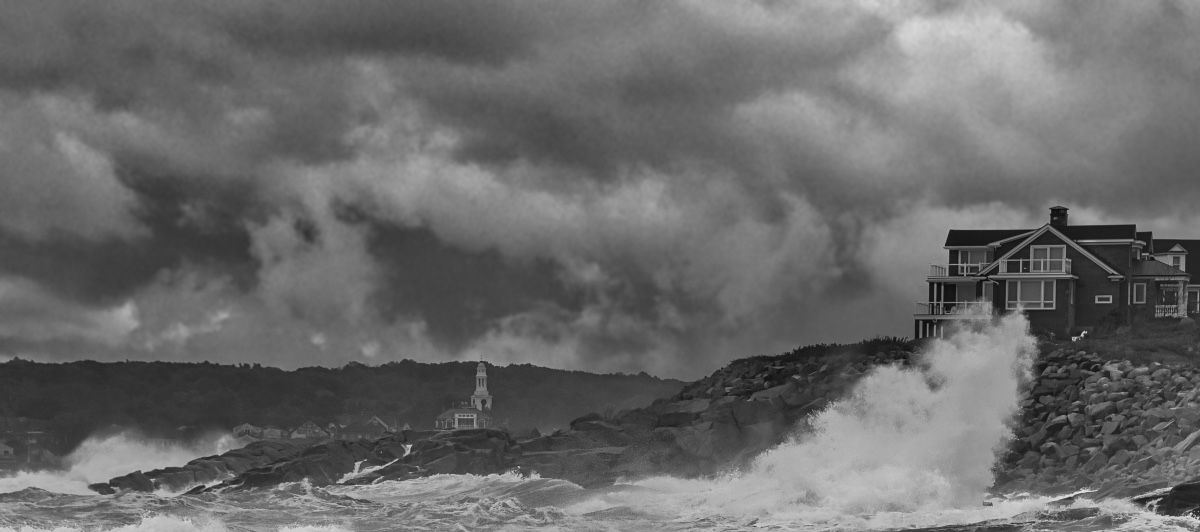
Yes, that is the chapel hiding behind the waves in my original. I think that is part of my story. It's just very difficult to get all of the waves to synch at the house and along the shore at the same time. I could live with the wall being smaller and cropping out the guest house/garage. But I think the wall is too shortened in your image. Unknown to you is that there is a granite quarry not far away and all of these stones and many others were used in these walls, without mortar, and have for the most part stood up to the Atlantic. History here: http://www.harbormasters.org/rockport/breakwater.shtml |
Jul 20th |
| 62 |
Jul 20 |
Comment |
Pete, where are going to stay when I inherit this place and the guest house is gone?
That's really not a bad edit, just not part of the PJ experience. Oh, that's right I put in a false sky. Oops |
Jul 20th |
| 62 |
Jul 20 |
Reply |
LuAnn, I've posted another photo and used he suggestions that you and others thought you would like to see. |
Jul 20th |
| 62 |
Jul 20 |
Comment |
Okay, several folks thought the wall and the "garage/guest house" of the home should be cropped. I've done that and used another wave and sky that was in the version with less wall. I personally do not think the overall image is as powerful as the one I originally posted. When you are on the shore across the small harbor and the waves have a mind of their own there are limitations and choices to be made. Comments on this version will be welcomed. |
Jul 20th |
 |
| 62 |
Jul 20 |
Comment |
Israel, A great job of catching this image. Fantastic smile and non-distracting background. Like Oliver, I would open the shadows caused by the hat brim on Meir's face. Making the white's of his eyes shine, brings the image to life. |
Jul 7th |
| 62 |
Jul 20 |
Comment |
Leah, converting this image to Bw was an excellent choice. The color of the original would of made me one of those just walking by. You achieved excellent focus and depth of field. The texture on the bags in the center of the image really speaks to the texture and shapes that you desired. I like Oliver's toning down of the wall below, but that also brings out the reflection in the window which I'm not fond of. |
Jul 7th |
| 62 |
Jul 20 |
Comment |
An excellent image LuAnn. I do find his stare at the camera to be riveting. That steel doesn't stay that hot white for very long and you got it. Just the right amount of detail in the background. I'm fine with your white mat/frame. I generally pick black, but in this case the white frame draws my eye to the same color of the reflection on his left eye glass, the furnace opening and the white hot steel on the anvil. All important storytelling details of your image. Great Job. |
Jul 7th |
| 62 |
Jul 20 |
Comment |
Add another old truck lover to the mix. I like Oliver's rendering of the trucks hilights, as I think they needed to be toned down. The details of the trucks windshield, door, wheels and flowers/ground cover are brought out of the shadows with Olivers rendering. I agree with your darkening the sky, but like you I'm 50/50 on whether the sky needs to be included. Great find. |
Jul 7th |
| 62 |
Jul 20 |
Comment |
Thanks for your input Emil. Maybe you are not familiar with Pigeon Cove Harbor, but there is a larger granite wall to the left of where I was standing and maybe in calm seas I could walk further to the left, but since I was alone and without my float vest or boat your vision could not happen. A disadvantage from going left is losing the view of the chapel on the far side of the cove. Perhaps, I could of walked along the top of the sea wall and gotten a view from above. Check out the walls around this harbor to protect it from the open sea. |
Jul 7th |
| 62 |
Jul 20 |
Comment |
Very sharp bumble bee and flower. Your wife is correct, these kind of bees are interested in collecting pollen and are considered peaceful. The details in the black part of body and legs is not usual, but it definitely adds to the image. That adjustment (lighting in Camera Raw?) and the flower might cause an issue with a Nature judge, but not here. The specimens also has beautiful wings that are sharp. Not easy @ 1/80 sec. Did you pop a flash? |
Jul 4th |
| 62 |
Jul 20 |
Comment |
Thanks for your comments Pete. Not sure if you were suggesting erasing the buildings and flag pole or cropping the right side? I can try erase buildings etc, but I love the texture and tones of the granite wall in the foreground and it makes for a separation between the calm area (harbor) that I'm in vs the wild surf to the outside.
Interesting thought on the sky, I had not picked up on similar patterns. Thanks.
|
Jul 4th |
9 comments - 2 replies for Group 62
|
27 comments - 10 replies Total
|









































































































































































